v10.0.0 Release Notes
Highest-rated 3D Liveness & Face Matching for iOS, Android & Webcams with NIST/NVLAP Lab Certified Level 1&2 Anti-Spoofing & a $600,000 Spoof Bounty Program.
v10 – Significantly Improved Security & Usability. FREE Unlimited Photo ID Scans With OCR, 2,300+ Officially Supported OCR Templates, Two+ Forms of ID Support, Universal 3D FaceVectors, & Much More
Improvements & Features in v10:
- Backwards Compatibility. FaceTec Server v10 is backwards compatible with v9.x.x of the FaceTec Device SDKs. All 3D FaceScans, 3D FaceMaps, and ID Scans generated from pre-v10 FaceTec Versions are compatible with FaceTec Server v10. The v10 Device SDKs ARE NOT backward compatible with v9.7.x and v9.6.x FaceTec Servers.
- Increased Security. Significant improvements have been made to FaceTec's 3D Liveness Security Layers to block emerging GenAI threats.
- Faster 3D FaceScans. Optimizations in the FaceTec Device SDK have improved end-to-end 3D FaceScan completion time by 50% on average across the 10,000+ supported Devices & Cameras.
- Faster FaceTec Server Builds. Optimizations in the Server Build Process have significantly improved FaceTec Server Build Times.
- Faster FaceTec Server Processing. Optimizations in the FaceTec Server Engine have significantly reduced overall processing times.
- Reduced Network Traffic in Core Scenarios. Overall payload size when using 3D Liveness, 3D:3D Re-Verification, 3D:2D Photo ID Matching & ID Scanning has been reduced, leading to faster UX.
- Reduced Network Traffic from Usage Logs. Overall size of Usage Logs has been reduced by over 50%, improving performance and reducing network transfer time and costs.
- Faster ID Scans. Photo ID Auto-Capture is now faster for ID Scans on all platforms.
- Streamlined Integration Code. Significant Reductions to the amount of code needed to integrate the FaceTec Device SDKs and FaceTec Server.
- No-Code Session Tokens. Session Token Security Checks are now handled automatically without the need for extra code and network request handling.
- Simple Key Management. SDK Encryption Keys & FaceScan/FaceMap/ID Scan Encryption Keys no longer need to be set in the v10 Device SDKs, reducing management overhead and improving version update times.
- Improved Support for Landscape Mode. The FaceTec Device SDKs can now be initialized and launched in Landscape Mode. If a 3D FaceScan or ID Scan is started in Landscape Mode, the User is shown a configurable screen prompting them to first rotate the Device into Portrait Mode.
- Improved Audit Trail Image Handling. Audit Trail Images are now output on the Server Side and no longer need to be handled in Device-Side Code.
- AMD Processor Compatibility. v10 FaceTec Server now supports Intel CPU Server Architectures and AMD CPU Server Architectures.
- Out-of-the-box SQL Database Support. v10 FaceTec Server now has out-of-the-box support for PostgreSQL Databases. SQL was supported in v9, but required the creation of a custom class. Additional SQL Database Products are now more easily supported by altering the provided PostgreSQL Implementation.
- Free & Unlimited ID Scans. Standalone ID Scans without a 3D Liveness Check are now supported and Free for all FaceTec Customers & Partners.
- Support for over 2,300+ OCR Templates. v10 FaceTec Server now supports over 2,300+ OCR Templates.
- OCR for 3rd Party Photo ID Images. v10 FaceTec Server introduces new APIs to OCR the contents of 3rd Party Photo ID Images. For more details, please see ID Scanning vs. 3rd Party Images.
- Universal 3D FaceVectors. Universal 3D FaceVectors allow FaceTec Customers & Partners to share 3D Face Data in a format that contains NO image data, making them ideal for cases that require enhanced privacy, such as Mobile Driver Licenses and Web 3.
- UI Improvements & Customizations. Screen Transitions and Animations are smoother across a wider variety of devices and OS versions. Developers can now customize the Display Times of various Screen Animations in the Device SDK UI.
- Universal Photo ID Mode. ID Scans can now be performed on any Photo ID, whether it is included in FaceTec's 2,300+ Official OCR Templates or not. This captures any Photo ID and still performs some authentication checks, even if FaceTec’s AI has never seen that Photo ID Type before.
- Dashboard + FaceTec Server. Improved Server Dashboard UI is included with Account De-duplication and Known Fraudster List Features.
- Video Injection & Camera Bypass Security. Lab Tested & Security Confirmed Level 4 & 5 Video Injection & Camera Bypass Security.
- 1:N Search/Duplicate Check Speed Improvements. 1:N Search/Duplication Checks now return faster in Large Databases (e.g. +1M 3D FaceMaps).
- Numerous Bug Fixes. All bugs addressed since the last version of v9.7 and v9.6 have been released as a part of this major version release.
- ID Front-Back Detection. v10 ID Scan UI and APIs automatically identify whether the front or back of a supported document is submitted. If the wrong side of the document is shown, then FaceTec will display an on-screen animation and message prompting the User to show the correct side of the document.
Integrating v10
If you are integrating FaceTec for the first time, FaceTec highly recommends using v10. Please see the Getting Started Guide and Server Integration Guide for more information.
If you are upgrading your v9 integration to v10, please review the v10 Getting Started Guide and Server Integration Guide to understand basic concepts for v10, and then see the Upgrade Guide below to learn about the changes in v10.
Guidance for all v10 Integrations: Your primary resource for understanding how to integrate v10 is the Device SDK Sample Apps. The Device SDK Sample Apps contain the minimal code necessary to implement FaceTec. Please thoroughly review how Initialization works, how FaceTec is customized and launched, and how the Session Request Processor sends Session Request Blobs and handles Response Blobs in the Device SDK Sample Apps.
v10 Upgrade Guide & Info
v10 Introduction
v10 is a major version release with many New Features and Improvements in the following areas:
- Improved Security designed to future-proof against emerging GenAI Threats.
- Improved Usability and Faster Data Capture in all UIs.
- Improved Device Compatibility.
- Improved User Experience during the 3D FaceScan and ID Scan.
- Improved Integrations and Reduced Integration Code Complexity.
- Backwards Compatibility with v9.x.x of the Device SDKs.
Although the v10 FaceTec Server is Backwards Compatible with the v9.x.x FaceTec Device SDKs, the v10 FaceTec Device SDKs use a new API on both the Device-Side and Server-Side.
Upgrades to the v10 FaceTec Server can be performed quickly because v10 ships with all v9.x.x FaceTec Server APIs. However, upgrading to the v10 Device SDKs will require significant changes to Your Device SDK Integration Code and will require new code to process the results from Your FaceTec Server.
v10 & v9.7 Compatibility, Side-by-side Releases
v10 FaceTec Server - Backwards Compatible
The v10 FaceTec Server is Backwards Compatible with the v9.x.x FaceTec Device SDKs. All 3D FaceScans, 3D FaceMaps, and ID Scans generated from older versions of the FaceTec Device SDKs can be processed with the v10 FaceTec Server. System Architectures that upgrade their backend to use the v10 FaceTec Server will still support v9 Device SDK Integrations and Users.
All v10 APIs that perform matches against Enrolled 3D FaceMaps, such as 3D:2D 3rd Party ID Photo and 3D:2D Profile Pic Matching, can be used with 3D FaceMaps from v9 or v10 Device SDK Integrations.
Deprecations Note: Backwards Compatibility does not apply to functionality that was already deprecated in v9. Please see the Removed API & Deprecations Table for a list of the deprecations that have been removed.
v10 Device SDK - Not Backwards Compatible with v9 FaceTec Server
The v10 Device SDK is not backward compatible with the v9.x.x FaceTec Server. You cannot use the v10 Device SDKs with a v9.x.x FaceTec Server.
As mentioned in Device & Server Version Compatibility, 3D FaceMaps generated with newer versions of the Device SDK are never guaranteed to work with older versions of FaceTec Server. Additionally, the v10 Device SDKs output data intended for the new and updated v10 Server APIs, which are not present in v9.
When will v9.7 stop receiving updates?
v9.7 will stop receiving updates and will no longer be available to download on February 1st, 2027.
Upgrading to v10
FaceTec recommends upgrading to v10 as soon as possible. When upgrading your team's SDKs, always start with FaceTec Server first, then the Device SDKs (see Device & Server Version Compatibility).
v10 API & Behavior Changes - Developer Overview
Simplified Processor Class & Single API for FaceTec's Core Features
A new API called /process-request is used for all operations that involve a 3D FaceScan or ID Scan.
To use this API, first generate a Request Blob by using the Start Method of one of FaceTec's Core Features (3D Liveness, 3D:3D Re-Verification, 3D:2D Photo ID Matching, or ID Scanning). Once generated, the Request Blob and an optional externalDatabaseRefID argument can be passed into /process-request.
Once FaceTec Server has finished processing the API Call, a Response Blob and the associated Additional Response Properties will be generated. The Device SDK will then handle the Response Blob to determine how it should proceed.
No-Code Session Tokens
The FaceTec Device SDKs no longer make explicit API Calls to retrieve the Session Tokens for starting FaceTec Sessions. When integrating the v10 FaceTec Device SDKs, Your Team no longer needs to write specific code to handle Session Tokens. Session Tokens are now automatically generated and fetched with Internal Logic in the FaceTec SDKs, reducing the overall code complexity and surface area for Integration Issues. Internal Session Token Management also provides v10 with an improved UI/UX with faster Session Start Times.
Simplified Key Management
Production Keys & FaceScan/FaceMap/ID Scan Encryption Keys no longer need to be set in the v10 Device SDKs. Production Keys are now automatically retrieved, whereas FaceScan/FaceMap/ID Scan Encryption Keys are now set and processed within the FaceTec SDKs themselves.
While not required for the v10 Device SDKs, you will still need to host and serve your v9 Production Keys for any Apps that have Users using the v9 Device SDKs. The v9 Device SDK APIs have not changed, and still require the Production Keys as an argument for v9 Device SDK Initialization.
Reduced Network Traffic
The Total Network Traffic Size for FaceTec's Core Features (3D Liveness, 3D:3D Re-Verification, 3D:2D Photo ID Matching & ID Scanning) has been reduced. The Total Network Traffic Size of FaceTec Usage Logs has been reduced.
FaceTec Server - Docker and Build Improvements
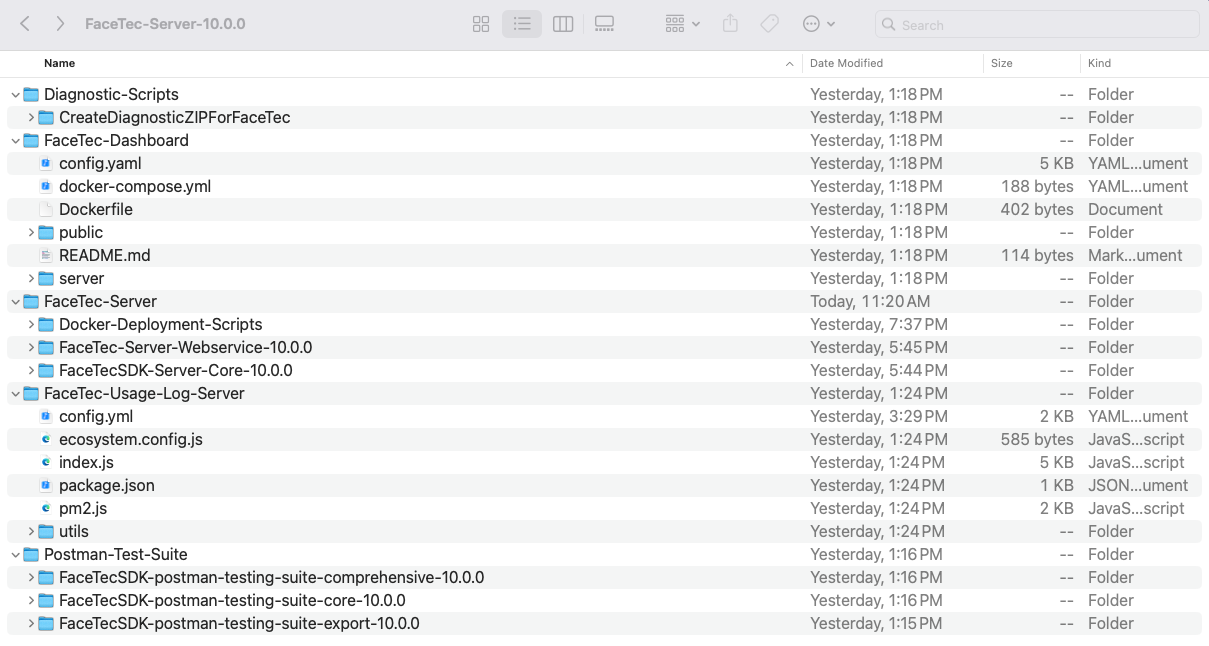
FaceTec Server is now offered as a single package (ZIP). The folder layout has been organized and simplified, and now includes all server-related sub-packages (Server Dashboard, Postman Test Suites, Usage Log Server, and Server Diagnostic Script). Several improvements have also been made to optimize the Docker Build Speed and Image Size.
Improved Audit Trail Image Handling
Audit Trail Images are now output on the Server-Side and no longer need to be handled using Device-Side Code.
FaceTec Server returns an Audit Trail Image for each Successful 3D Liveness, 3D Enrollment, and 3D:3D Re-Verification Session performed by the User. The Audit Trail Image is stored in the auditTrailImage field of the data object on the database record for that Session.
In the rare event that a User performs one or more Sessions and does not Succeed during their interaction with FaceTec, the Audit Trail Image(s) from the User's Sessions are stored in the auditTrailImageSequence field of the data object on the database record created.
ID Scan - Watermark & Hologram Detection
In addition to the previous features included in FaceTec's ID Scanning, v10 introduces Watermark & Hologram Detection.
400+ OCR Templates have Watermark & Hologram Detection Enabled. A maximum of two Watermarks and one Hologram can be marked on each OCR Template.
ID Scans are requested to be re-scanned the first time that an Expected Watermark/Hologram is not detected. This Retry Behavior can also be ignored by using the IGNORE_WATERMARK Retry Modifier.
SQL Database Support
FaceTec Server now offers out-of-the-box support for PostgreSQL Databases. SQL was supported in v9, but required the creation of a custom class. Additional SQL Products are now more easily supported by altering the provided PostgreSQL Implementation.
To use a PostgreSQL Database, download FaceTec Server using the Configuration Wizard and specify "PostgreSQL" in Database Type. FaceTec Server can then be downloaded and launched by following the guidance in Step 7 of the Setting up FaceTec Server Guide.
Important Note: The default example PostgreSQL connection string 'jdbc:postgresql://localhost:5432/facetec_sdk_data' assumes Your Database name is 'facetec_sdk_data'. You can use any PostgreSQL-compatible database name, but Your Database must be created before initializing Your FaceTec Server Webservice so it works as expected. Tables and indexes required for FaceTec Server functions will be created automatically.
Simplified & Refactored SDK Sample App
The Sample App has been significantly simplified & refactored for clarity. Integration of the FaceTec SDK is even easier as a result of the latest improvements and features in v10.
Server-Side Front & Back Images of ID Scans
The Front and Back Images of the ID Scan have been added to the Server-Side ID Scan Results. The Front and Back Images are no longer retrieved on the Device-Side and sent to FaceTec Server.
Enforcement of Session Initialization
New checks in the FaceTec SDKs ensure Sessions cannot be started until the FaceTec SDK has finished initialization.
Simplified Status Codes
Status Codes for the Device and FaceTec Servers have been updated to be self-descriptive with their meanings easily inferred.
Removal of All Deprecations
All deprecations in prior versions of the FaceTec SDKs have been removed. For the full list of deprecations that have been removed, please see the Removed API & Deprecations Table.
Upgrading FaceTec Server - Guide
When upgrading Your Integration to v10, upgrade Your FaceTec Server to v10 first. The v10 FaceTec Server is compatible with v9 Device SDK Integrations. After Your Team has the v10 FaceTec Server v10 running in Your Production Environment, Your Team can update the Device SDKs to v10 as a separate step.
The v10 FaceTec Server is provided as a ZIP file. The v10 FaceTec Server ZIP file contains the FaceTec Server Webservice Layer, the FaceTec Server Core JAR, FaceTec Server Dashboard, Postman Test Suites, Usage Log Server, and Diagnostic Scripts.
Getting Started
To get started, download the v10 FaceTec Server from the Downloads Page.
In v9, the FaceTec Standard Server was a pre-built JAR built from the same code as the FaceTec Custom Server Package. In v10, the ZIP contains both the Pre-Built JAR and the Source Files, so Your Team can choose how to launch it based on whether any Code Customizations need to be applied.
To set up and run FaceTec Server, please see the Setting up FaceTec Server Guide.
Deployment & Hosting Changes in the v10 FaceTec Server
The following is a list of updates in the v10 FaceTec Server related to deployment and hosting:
- Backwards Compatiblity with v9 Device SDK Sessions.
- Improved FaceTec Server Build Times.
- Improved FaceTec Server Response Times.
- The Pre-Built JAR and the FaceTec Server Webservice Source Code are now both included.
- Previously, Standard Server contained the Pre-Built JAR, but not the Source Code
- Previously, Custom Server contained the FaceTec Server Web API Layer Source Code, but not the Pre-Built JAR.
- New Thread Priority System.
- A Thread Queue is created for Compute-Intensive Transactions, such as processing 3D FaceScans, 3D FaceMaps, ID Scans, or 2D Images.
- A Separate Thread Queue is created for Lighter-Weight Transactions, such as Initialization and Specific Event Calls.
- Default Deployment Method now launches FaceTec Server and FaceTec Usage Log Server in separate containers (but still on the same instance).
- This change has made it easier to configure the Usage Log Server to run on Standalone Instances that may improve Resource Management and Observability in Your System's Architecture.
- Previously, FaceTec Server and FaceTec Usage Log Server were started inside the same container.
- FaceTec Server Dashboard and FaceTec Postman Test Suites are now both included in FaceTec Server.
Upgrading to v10 from the v9 FaceTec Standard Server
In v9, the Standard Server Package included one pre-compiled JAR without Source Files for the Webservice.
In v10, FaceTec Server still includes a Precompiled JAR. Similar to the v9 Standard Server Package, Your Team can still run FaceTec Server without recompilation.
Unlike the v9 Standard Server Package, v10 also includes the Source Code for the Webservice. If Your Team needs to make changes to the Webservice, then Your Team can use the appropriate Docker Commands to build and run the Webservice to incorporate Your Team's Code Changes.
Running the v10 FaceTec Server with the Prebuilt Webservice
To run FaceTec Server with the Precompiled Webservice JAR, use the default run.sh script located in the /Deployment-Scripts folder.
The default run.sh script will build the facetec_server_webservice_prebuilt_with_usage_log_server and facetec_usage_log_server Docker Images outlined in the /Deployment-Scripts/docker-compose.yml file, and then start both. The facetec_server_webservice_prebuilt_with_usage_log_server service depends on facetec_usage_log_server and will start after the Usage Log Server is up and running.
Docker Layer Caching
The Dockerfiles have been optimized to leverage Docker Layer Caching to make rebuilding the image more performant. For example, small changes to the Configuration File will result in a Nearly-Instantaneous Rebuild that no longer requires the Time-Intensive Process of re-copying the Webservice JAR and Server Core JAR into the image, even though there were no changes in these JARs.
Upgrading to v10 from the v9 FaceTec Custom Server
In v9, the Custom Server Package included the Webservice Source Code. However, it needed to be compiled before the FaceTec Server Webservice could be launched.
In v10, FaceTec Server includes a Precompiled JAR of the Webservice, so Your Team can launch FaceTec Server faster in scenarios where Code Modifications are not needed.
To run FaceTec Server with the Precompiled JAR, use the default run.sh script located in the /Deployment-Scripts folder.
Running the v10 FaceTec Server with the Prebuilt Webservice
The default run.sh script will build the facetec_server_webservice_prebuilt_with_usage_log_server and facetec_usage_log_server Docker Images outlined in the /Deployment-Scripts/docker-compose.yml file, and then start both. The facetec_server_webservice_prebuilt_with_usage_log_server service depends on facetec_usage_log_server and will start after the Usage Log Server is up and running.
The Dockerfiles have been optimized to leverage Docker Layer Caching to make rebuilding the image more performant. For example, small changes to the Configuration File will result in a Nearly-Instantaneous Rebuild that no longer requires the Time-Intensive Process of re-copying the Unmodified JARs (i.e. the Webservice JAR and Server Core JAR).
Compiling and Running the v10 FaceTec Server with Code Modifications
To compile and run the v10 FaceTec Server Webservice with Code Modifications, run the following commands in the terminal:
- Run
docker compose build facetec_server_webservice_recompiled_with_usage_log_server facetec_usage_log_server. - Run
docker compose up facetec_server_webservice_recompiled_with_usage_log_server facetec_usage_log_server.
The above commands will build the facetec_server_webservice_recompiled_with_usage_log_server and facetec_usage_log_server Docker Images outlined in the /Deployment-Scripts/docker-compose.yml file, and then start both. The facetec_server_webservice_recompiled_with_usage_log_server service is dependent on the facetec_usage_log_server and will start after the Usage Log Server is up and running.
Docker Layer Caching
The Dockerfiles have been optimized to leverage Docker Layer Caching to make rebuilding the image more performant. For example, small changes to the Configuration File will result in a Nearly-Instantaneous Rebuild that no longer requires the Time-Intensive Process of re-copying the Unmodified JARs (i.e. the Webservice JAR and Server Core JAR).
Upgrading to v10 from v9 FaceTec Server Core
The v10 FaceTec Server Core is located in the FaceTec-Server/FaceTecSDK-facetec-server-10.0.0/FaceTecSDK-server-core-java-10.0.0/ folder.
If Your Team's System is currently using the v9 FaceTec Server Core, but not using the v9 Custom Server or v9 Standard Server, then Your Team can replace the v9 JAR with the v10 FaceTec Server Core JAR. After updating the JAR, Your Team's System will still be able to support Your Team's Current Applications that are running with the v9 FaceTec Device SDKs.
Recommendation: If Your Team is currently only using a Custom Implementation of the v9 FaceTec Server Core, then FaceTec recommends migrating Your System to the default v10 FaceTec Server Webservice. If Your Team still needs to make Code Customizations, then this is still 100% supported by modifying the Source Files for the FaceTec Server.
While v10 still supports Custom Implementations of FaceTec Server Core, Your Team will likely see benefits in Code Maintainability, Stability, and Engineering Costs by using FaceTec's Default FaceTec Server Implementation.
To implement support for the v10 FaceTec Device SDKs in Your Customized FaceTec Server Core Implementation, please review the Javadocs, SessionRequestProcessor.java, and the Associated Files in FaceTec Server. FaceTec's Default Implementation of the FaceTec Server Webservice should be your primary resource for understanding FaceTec's Recommended Implementation.
FaceTec Usage Log Server Changes
The FaceTec Usage Log Server has been decoupled from the FaceTec Server Webservice's Docker Container. The Default Run Configuration now starts the Usage Log Server's Docker Container and the FaceTec Server Webservice's Docker Container side-by-side on the same instance.
The FaceTec Server Webservice and Usage Log Server should be considered as separate entities in Your Architecture. FaceTec also recommends that Your Team considers creating a Persistent Usage Log Server instance or hosting several instances for high availability. The New Default Configuration makes this easier and more flexible, and it allows Your Team to make updates to the Usage Log Server and FaceTec Server as separate processes.
Please see the Usage Logs Guide for more information on Usage Log Server setup and common architectures.
Running the Usage Log Server and FaceTec Server Webservice (Side-by-Side)
To run the Usage Log Server and FaceTec Server Webservice side-by-side, execute the included run.sh script found in /FaceTec-Server-10.0.X/FaceTec-Server-Webservice/Docker-Deployment-Scripts/. The script starts the Usage Log Server's Docker Container and waits for it to be up and running before starting the FaceTec Server Webservice's Docker Container.
Running the Usage Log Server Independently (Standalone)
The Usage Log Server can also be run independently by navigating to the directory with the docker-compose.yaml file /FaceTec-Server-10.0.X/FaceTec-Server-Webservice/Docker-Deployment-Scripts/ and running docker compose build facetec_usage_log_server && docker compose up facetec_usage_log_server.
Database Changes
There are no breaking Database Changes in v10. If Your Team is using FaceTec's standard Database Implementations and using the FaceTec Server APIs without any Code Modifications, then no Database-Related Changes are needed.
However, v10 stores data with updated code and some added properties.
In v10, /process-request stores and retrieves an encrypted SessionHistoryData Object.
The Session History Data (SessionHistoryData) is a required data object to achieve correct behavior in v10. Examples of storing and retrieving the SessionHistoryData object can be found in SessionRequestProcessor, MongoDB, and the PostgreSQL Database Implementations.
The FaceTecDatabase Class has been updated to only include the required abstract functions for v10. The Database Calls required for v9 have been split out in the FaceTecDatabaseV9 Interface and are implemented by default in FaceTecDatabase. Calling the v9 APIs will use the FaceTecDatabaseV9 Interface and Classes, and calling the v10 APIs will use the FaceTecDatabase Interface and Classes.
If Your Team is a New Customer that does not need to support v9, then Your Team only needs to support the Database Calls outlined in the FaceTecDatabase Interface and Classes.
Upgrading FaceTec Device SDKs - Guide
Your primary resource for understanding how to integrate v10 is the Device SDK Sample Apps. The Device SDK Sample Apps contain the minimal code necessary to implement FaceTec. Please thoroughly review how Initialization works, how FaceTec is customized and launched, and how
SessionRequestProcessorsends Session Request Blobs and handles Response Blobs in the Device SDK Sample Apps.
v10 Device SDK Upgrade Considerations Overview
The following are high-level considerations for updating Your Team's Existing Apps to use the v10 Device SDKs:
- The v10 FaceTec Device SDKs contain major changes to Initialization, FaceTec UI launching, and Processing.
- The v10 FaceTec Device SDKs' Interface Customization APIs are mostly the same as v9, with exceptions around Specific APIs that have been renamed and Text Customization APIs that have been improved by converting them to Simple Localization Strings, rather than dynamically setting them in code (leading to Simplified Integrations and Lower Long-Term Engineering Costs).
- Deprecated APIs from v9 have been removed in v10.
There are specific Start functions (e.g.
start3DLiveness) to launch the FaceTec UI. Please see the SDK Sample Apps for more details.The Processor Integration Coding has been significantly reduced and simplified. Please see the SDK Sample Apps for more details.
Please see the List of API Changes and Removals at the bottom of this guide.
v10 Device SDK Upgrade - Approach
The following is a step-by-step list of instructions to update Your v9 Device SDKs to v10:
- Download and run the v10 Device SDK Sample Apps.
- Test All Functionality of the v10 Device SDK Sample Apps without making any code modifications.
- Set up a QA Version of the v10 FaceTec Server in Your Infrastructure.
- Test Your Team's Current Apps with the v9 Device SDKs against the v10 FaceTec Server. The v10 FaceTec Server is backwards compatible with the v9 Device SDKs, so this will "just work".
- Update the v10 Device SDK Sample Apps to use the v10 FaceTec Server running in Your Infrastructure. This step will prove that Your Team can run FaceTec's Default Implementation of the v10 Device SDKs against Your Team's v10 FaceTec Server.
- Review and understand how Initialization works in the v10 Device SDKs. The SDK Sample Apps contain simple, well-documented code that demonstrates how to do this correctly.
- Review and understand how starting FaceTec works in the v10 Device SDKs. The SDK Sample Apps contain simple, well-documented code that demonstrates how to do this correctly.
- Review and understand how the Session Request Processor works in the v10 Device SDKs. The SDK Sample Apps contain simple, well-documented code that demonstrates how to do this correctly.
- Review and understand how UI and Text Customizations work in the v10 Device SDKs. The SDK Sample Apps contain simple, well-documented code that demonstrates how to do this correctly, and this functionality is largely unchanged from v9 to v10.
- Integrate v10 into Your Apps by updating how FaceTec is initialized, started, and used with Session Request Processor. This will be the most significant step because it will involve updating the code in Your Team's Real App.
- Update any code that was using Deprecated or Changed APIs (List of API Changes and Removals).
- Thoroughly test Your Team's Updated Implementation. Ensure all Core Functionality works. Ensure all UI, Text Customizations, and Localizations are applied correctly.
v10 Device SDK - Processor Changes
The Device SDK Processors have been simplified to decrease overall code complexity. The SDK Sample Apps and functions in the v10 Device SDKs contain significant information about how to integrate v10, specific recommendations, and callouts pertaining to anti-patterns.
The Session Request Processor and its Associated Files demonstrate the Recommended Implementation and should be left intact and unmodified as much as possible. Adding Logic or Making Code Changes that deviate from the Session Request Processor's Demonstrated Functionality is not supported and may lead to unexpected issues, limiting FaceTec's Ability to assist Your Team in these scenarios.
Listed below are some of the Logic and Code Changes that could result in unexpected issues in Your Integration:
- Creating Asynchronous Timers
- Enforcing Custom Callbacks
- Adding Race Conditions in Your Logic and Code
- Changing the FaceTec UI Launching Code
- Making Extraneous Network Requests
- Invoking App UI Changes
- Altering FaceTec's UI or Logic with Undocumented Methods
Handling the externalDatabaseRefID Parameter
Examples of how to use the externalDatabaseRefID Parameter are included in the SDK Sample App, but these should be removed entirely from Your Device-Side Integration. The externalDatabaseRefID Parameter should instead be handled in Your Team's Webservice. This guidance is the same as v9 and is unchanged in v10, but the latest SDK Sample Apps have been updated to further emphasize this in the code.
Important Note: To ensure that the FaceTec Sample App acts as a self-contained tutorial, externalDatabaseRefID is generated and passed to the Server on the Device-Side. This is purely for Demonstration Purposes and to ensure all FaceTec Functionality in the SDK Sample Apps can operate appropriately without additional coding. Real Integrations should not generate or use externalDatabaseRefIDs on the Device Side, and instead, generate or retrieve these in Your Team's Webservice. For more information on externalDatabaseRefID, please see Using ExternalDatabaseRefID.
Testing
It is Extremely Important that Your Team fully tests Your Applications and fully tests all scenarios supported by Your Applications. Your Team must Extensively Test Integrations in Your Team's QA Environment before putting them into Production.
Please make sure that Your Team deploys the v10 FaceTec Server to a Pre-Production Environment and tests all Integrations and Important Scenarios prior to releasing them into a Production Environment.
Important Test Case Considerations:
- Ensure Your Team's v9 Device SDK Encryption Keys continue to be updated, per Your Already-Existing Process.
- Ensure Your Team's Applications using v9 Device SDKs continue to function in all Core Scenarios (i.e. all scenarios involving 3D Liveness, 3D Enrollment, 3D:3D Re-Verification, 3D:2D Photo ID Matching, and Standalone ID Scanning).
- Ensure Your Team's Test Scenarios include cases where Your Application's Users failed to update to Your Applications' Newest Versions and continue to run older versions of the v9 FaceTec Device SDKs.
- Ensure Your Team's Backend Processes continue to function when processing API Calls with the v10 FaceTec Server.
- Ensure Your Team's v10 Usage Log Server is running and sending Usage Logs to FaceTec.
- Ensure Your Team's Applications are updated to use the v10 Device SDK Functionality in all Core Scenarios (i.e. all scenarios involving 3D Liveness, 3D Enrollment, 3D:3D Re-Verification, 3D:2D Photo ID Matching, and Standalone ID Scanning).
API & Feature Change Notices
New APIs & Features
| Name | v10 API | Additional Details |
|---|---|---|
FaceTec Session Request Processor Android, iOS, and Browser | FaceTecSessionRequestProcessor | New Class Interface/Protocol in the Device SDK to handle Request Blobs coming from the FaceTec Device SDK and Response Blobs from FaceTec Server. Please see the SessionRequestProcessor Class in the SDK Sample Apps. |
Process Session Request Server | FaceTecSDKInstance.processSessionRequest() | New Method in FaceTec Server to handle and process Request Blobs. Please see the SessionRequestProcessor Class in FaceTec Server. |
Get Session History Data Server | FaceTecSDKAdditionalDataCallback.getSessionHistoryData() | New Method in FaceTec Server for retrieving the Session History Data from the Launch ID of the Session. |
Store Cancelled Session Results Server | FaceTecSDKAdditionalDataCallback.storeCancelledSessionResult() | New Method in FaceTec Server for storing the Session History Results of a Cancelled Session. |
Check Replay Hash Server | FaceTecSDKAdditionalDataCallback.checkReplayHash() | New Method in FaceTec Server for determining if the FaceScan was already processed in a Previous Session. |
Get Enrolled FaceMap Server | FaceTecSDKAdditionalDataCallback.getEnrolledFaceMap() | New Method in FaceTec Server for retrieving an Enrolled 3D FaceMap. |
Front & Back Images in ID Scan Results Server | FaceTecIDScanOnlyResultV10.photoIDFrontImage | The Front and Back Images from the ID Scan are now output on the Server-Side and no longer need to be handled using Device-Side Code. |
Server-Side Audit Trail Images Server | FaceTecResponseResult.auditTrailImage | Audit Trail Images are now output on the Server-Side and no longer need to be handled using Device-Side Code. |
Additional Review Tag Android, iOS, and Browser | String Name - "FaceTec_result_idscan_additional_review_tag_message" | New UI that is shown on the bottom of the Result Screen when the ID Scan has been completed, but the results were flagged in at least one of the Scans. |
Orientation Screen for Rotating to Portrait Mode Android, iOS, and Browser | FaceTecOrientationScreenCustomization.backgroundColors | Customizes the Orientation Screen, which notifies the User to rotate their Device to Portrait Mode. |
Result Screen Animation for ID Scan Success Customizations Android, iOS, and Browser | FaceTecResultScreenCustomization.resultAnimationIDScanSuccessForegroundColor | Customizes the "Success Animation" on the ID Scan Result Screen. |
Result Screen Upload Message Android, iOS, and Browser | FaceTec_result_facescan_upload_message_still_uploading | Customizes the Upload Message that notifies the User that their upload is still occurring. In v9, this was handled via Device-Side Code, but the message is now defined as a Localization String. |
Timer Delay for Result Screen Upload Message Android, iOS, and Browser | FaceTecResultScreenCustomization.faceScanStillUploadingMessageDelayTime | Customizes the Length of Time before the "Still Uploading" Message appears. In v9, this was handled via Device-Side Code, but this can now be set with a configuration. |
Updated APIs & Features
| Name | v10 API | V9 API | Additional Details |
|---|---|---|---|
FaceTec Start Methods Android, iOS, and Browser | FaceTecSDKInstance.start3DLiveness() | FaceTecSessionActivity.createAndLaunchSession() (Android Only) | Each FaceTec Core Feature now has its own unique Start Method. Each of these Start Methods use the same type of Processor (Session Request Processor). |
Additional Review Screen Image iOS | FaceTecIDScanCustomization - additionalReviewScreenImage | FaceTecIDScanCustomization - additionalReviewScreenScreenImage | API Name updated to match the one in the Android and Browser SDKs. |
Image Processing Status Enum Server | 0 = PROCESSED | 0 = FACE_FOUND_WITH_SUFFICIENT_QUALITY | Image Processing Status Enumeration Values have been updated. |
Accessibility Search Group Server | FaceTec3D3DAccessibilitySearchGroup | FaceTec3D3DOneEyeCoveredSearchGroup | The "One Eye Covered" Search Group has been renamed to the "Accessibility" Search Group. |
Result Screen Success Message Android, iOS, and Browser | FaceTec_result_facescan_success_3d_enrollment_message | FaceTec_result_success_message | The Success Message can now be defined for each type of FaceTec Session. In v9, this was handled via Device-Side Code, but each message is now defined as a Localization String. |
Saving v9 FaceScans & ID Scans Server | saveOriginalV9FaceScans | saveOriginalScans | The names of the Configuration Values for saving V9 FaceScans and ID Scans have been updated. |
Removed APIs & Deprecations
| Name | Removed APIs & Deprecations | Additional Details | |
|---|---|---|---|
FaceTec SDK Status and FaceTec ID Scan Status Android, iOS, and Browser | FaceTecSDKStatus | The Status Messages for FaceTec Initialization and FaceTec ID Scanning are now in FaceTecSessionStatus. | |
FaceTec Session Status Description Android, iOS, and Browser | Android SDK: String Enumeration in FaceTecSessionStatus iOS SDK:descriptionForSessionstatus Browser SDK:getFriendlyDescriptionForFaceTecSessionStatus | The Status Names are Self-Descriptive and no longer need String Descriptions.
| |
Succeed and Retry Methods Android, iOS, and Browser | Android SDK: FaceTecFaceScanResultCallback.succeed FaceTecFaceScanResultCallback.onFaceScanResultSucceed FaceTecFaceScanResultCallback.succeed | The Succeed and Retry Methods have been deprecated and unused in the FaceTec SDK Sample Apps for over two years.
| |
Override Upload & Result Screen Messages Android, iOS, and Browser |
| Replaced by using String Localizations. | |
Landscape Mode, Reverse Portrait & Orientation Change Status Enumerations Android, iOS, and Browser | Android SDK: FaceTecSessionStatus.LANDSCAPE_MODE_NOT_ALLOWED FaceTecSessionStatus.FaceTecSessionStatusLandscapeModeNotAllowed FaceTecSessionStatus.LandscapeModeNotAllowed |
| |
Device SDK Front & Back ID Scan Images Android, iOS, and Browser | Android SDK: FaceTecIDScanResult.getFrontImagesCompressedBase64() FaceTecIDScanResult.frontImagesCompressedBase64 FaceTecIDScanResult.frontImages | The Front and Back Images from the ID Scan are now output on the Server-Side and no longer need to be handled using Device-Side Code.
| |
Device SDK Audit Trail Images Android, iOS, and Browser |
| Audit Trail Images are now output on the Server-Side and no longer need to be handled using Device-Side Code. | |
V9 Age Estimation APIs Server | FaceTecAge2DResult(), | Legacy APIs for Age Estimation have been removed.
| |
Age Estimation Properties Server | ageEstimateGroupEnumInt, |
| |
Configuration File's skipNFC and skipOCRConfirmationScreen Fields Server | skipNFC |
| |
Single Behavior Modifier for Skipping both the NFC and User Confirmation Screen Server | FaceTecBehaviorOverrides.SKIP_NFC_AND_USER_CONFIRMATION | The same behavior can be defined by using both of the SKIP_NFC and SKIP_USER_CONFIRMATION Modifiers. | |
Deprecated Method for Scan Result Blob Server | getScanResultBlob() | The getScanResultBlob() method still exists for v9 Compatibility, but it is now specified as getScanResultBlob(FaceTecBehaviorOverrides[]. | |
OCR Results as a JSON String Server | FaceTecMatch3D2DIDScanResult.ocrResults | OCR Results can be accessed in the documentData Property. |