SDK Encryption Keys
This guide discusses the FaceTec SDK Encryption Key System.
Overview
Initializing the FaceTec Device SDKs in Development Mode performs the important task of validating Your Application by making a network request to FaceTec Servers. This validation mechanism is required during Initial Development until a Commercial Agreement is made.
Initializing the FaceTec SDKs in Production Mode with the Production SDK Encryption Keys allows the FaceTec Device SDKs and FaceTec Server to operate in a mode that makes no network requests to FaceTec's Servers.
Development Mode vs. Production Mode
Development Mode should only be used when Your Team is familiarizing itself with the Device SDK Functionality or Your Team does not have a Commercial Agreement with FaceTec. Production Mode should be used once Your Team has a Commercial Agreement with FaceTec, even if Your Team is still in the Development Phase of Your Application.
Development Mode: (Not For Production!)
- HTTPS Network Calls are made to FaceTec's Servers.
- Used when Your Team does not have a Commercial Agreement with FaceTec.
- Validated using
FaceTecSDK.initializeWithSessionRequest() - Usage Logs are transmitted over HTTPS automatically.
Production Mode:
- Network Calls are NOT made to FaceTec's Servers.
- Used when Your Team has a Commercial Agreement with FaceTec (even if Your Team is still in the Development Phase of Your Application).
- Validated using
FaceTecSDK.initializeWithSessionRequest() - Your Team's Production Key is used in the FaceMap Encryption & Decryption process and must be regularly rotated when FaceTec generates new Keys.
Important Note: Configuration Wizard auto-generates the Configuration File with the Latest Production Keys when Your Team downloads the FaceTec SDK.
FaceTec Initialization with Device & Production Keys
For v10 Device SDKs, only the Device Key Identifier needs to be specified in the Device SDK for Initialization. However, for v9 Device SDKs, the Production Key still needs to be served to the Device SDK from an API or Dynamic File.
v10 Device SDK Initialization and Key Updates
For v10 Device SDKs, the FaceTec Device SDK only needs to be explicitly provided with the Device Key Identifier for Initialization. The Device Key Identifier is a Permanent Key with no Expiration Date, so it generally does not need to be updated.
When updating a v10-Only Integration, your team typically only needs to update the Production Keys on the Server-Side.
To update the Production Keys on the Server-Side, please see FaceTec Server Initialization and Key Updates.
Important Note: Even though it is not being explicitly provided, the FaceTec SDKs are still validating Your Device Key Identifier against Your Production SDK Encryption Key Text, Package/Bundle IDs, and Domain Names. In v10, the FaceTec Device SDK retrieves all of this information from the Production Key in Your Team's FaceTec Server. Because the Device SDK is using the Production Key for Initialization, the Device SDK will fail to initialize if the FaceTec Server's Production Key is invalid or expired.
v9 Device SDK Initialization and Key Updates
For v9 Device SDKs, the FaceTec Device SDK needs to be explicitly provided with both the Device Key Identifier and the Production Key for Initialization. The FaceTec Device SDK is part of Your Client-Side Code and is downloaded directly onto the User's Device for Android and iOS Apps. Since every Production Key has an Expiration Date, it is imperative for a v9 Device SDK Integration to dynamically retrieve the latest Production Key. Otherwise, Users will need to update their Application every time the Production Key is updated.
The Production Key can be dynamically served to the Device SDK via an API. The ideal place to call this API would be in the Device SDK's Configuration File. Below is an example of how the Production Key can be retrieved in the Android SDK's Config.java file:
# getProductionKey(DeviceKeyIdentifier, ProductionKeyURL) retrieves the Production Key by
# calling the /getProductionKey API on Your Server. This method and API are defined by Your Team.
static String ProductionKeyText = getProductionKey(DeviceKeyIdentifier, ProductionKeyURL);
The Production Keys also need to updated on the Server-Side. on both the Device-Side and the Server-Side.
To update the Production Keys on the Server-Side, please see FaceTec Server Initialization and Key Updates.
FaceTec Server Initialization and Key Updates
The Production Key can be updated in the FaceTec Usage Log Server's config.yml file.
The Usage Log Server's Configuration File is automatically configured to use the latest Production Key when downloading the FaceTec Server Package with the Configuration Wizard.
The Production Key can also be directly specified by manually updating the highlighted portion in the config.yml file that is shown below:
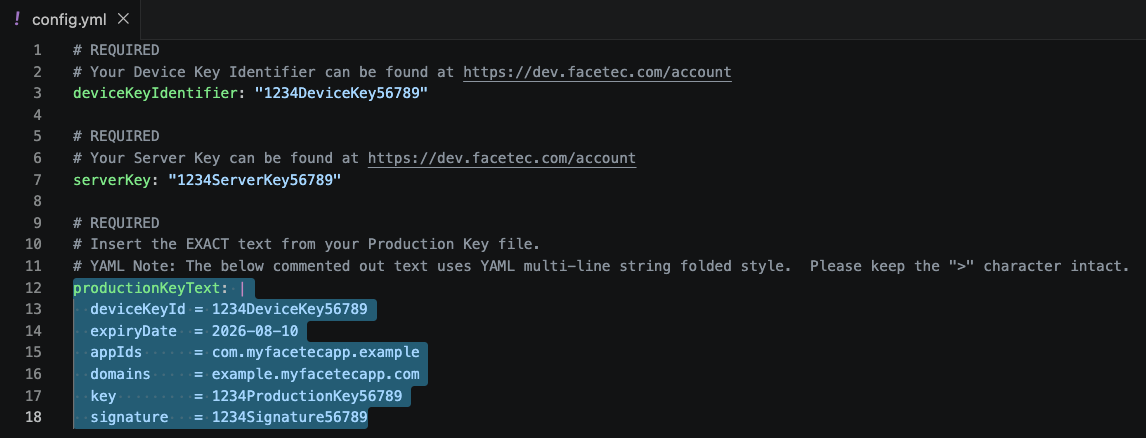
Important Note: To start the v10 FaceTec Server and Usage Log Server, the FaceTec Usage Log Server's config.yml file must have valid Production Keys. After a short grace period, the v10 FaceTec Server and Usage Log Server will not operate if the Production Keys specified in the Usage Log Server's config.yml file are invalid or expired.
Key Security
SDK Encryption Keys MUST be rotated every 90 days per FaceTec's Update Policy because they are involved in the low-level encryption and decryption mechanism of Your App. This is CRITICAL for the security of your App!
Important Note: FaceTec is constantly improving and adding new Security Layers to Detect & Reject a broad spectrum of Attack Vectors, as well as numerous improvements to Usability & Compatibility to all SDKs. FaceTec recommends that Your Team implement a Weekly/Monthly Update Calendar to ensure that not only FaceTec, but all of Your Application's SDKs and Dependencies, are continuously up-to-date and benefiting from the latest Security, Usability & Compatibility Improvements.
Server Key
This is a unique Private Key needed for initialization of the FaceTec Server. This data is needed to initialize the FaceTec Server in Production Mode. In Production Mode, you also need the Device Key Identifier, Production Key, and 3D FaceScan/FaceMap/IDScan Encryption Key in order to initialize successfully.
Important Note: The Device Key Identifier, Server Key, and Production Key are bound together and can be accessed from Your Account Page. Because keys are involved in the encryption/decryption process, key mismatches between client and server is one likely cause of "FaceMap could not be decrypted" behaviors.
Production SDK Encryption Key Text
The Production SDK Encryption Key Text (i.e. the Production Key) is Digitally-Signed Key Text that is required for initializing the FaceTec Server in Production Mode. This text is available as a file that can be downloaded from Your Account.
The Production Key is cryptographically verified against Your Device Key Identifier and Server Key during Initialization. Usage of this Digitally-Signed Key Text allows the FaceTec SDKs to operate in a mode that does not require a Network Call to the FaceTec Servers. Your Production SDK Encryption Key Text is:
- Needed for Initializing FaceTec Servers.
- Rotated to ensure the Security of Your App and initially issued for relatively short durations to ensure Your App is configured correctly when initially Going into Production Mode.
Important Note: The Device Key Identifier, Server Key, and Production Key are bound together and can be accessed from Your Account Page. Because keys are involved in the encryption/decryption process, key mismatches between client and server is one likely cause of "FaceMap could not be decrypted" behaviors.
Managing Multiple FaceTec Server Environments
Standard Policy: FaceTec typically only supports the creation of new Production Keys (i.e. Production SDK Encryption Key Text Files) for cases where a New Application/Service is being integrated into an Existing System and the New Application/Service must have its data isolated from the Existing Applications/Services. For instance, new Production Keys might be needed for FaceTec Partners or Customers that not only have multiple Production Services, but also have a brand new Application that needs to be integrated into one of their Existing Production Services.
Your Dev/QA Environments: FaceTec understands that you need to have Your Own Production and QA Environments. However, you do not need separate FaceTec Keys for each environment. Creating and managing entirely different sets of FaceTec Keys for Your Production vs. QA Environment will be difficult to implement correctly, will lead to key mismatch behaviors that will be difficult to investigate, and will require Your Team to adhere to FaceTec's Update Policy for both Your Production and QA Environments.
Usage Log Keys
The Usage Log Server can be configured with an HTTPS or SFTP Keys. To learn how to configure the keys for the Usage Log Server, see Configuring Usage Log Upload.
Encryption Key Types
| Key Name | Key Description | Validity Period | Created By | How is it uploaded? |
|---|---|---|---|---|
| Device Key Identifier (deviceKeyIdentifier) | A unique Public Key for initializing the FaceTec Device SDK and FaceTec Server. | Permanent | FaceTec | Automatically via Configuration Wizard |
| Server Key (serverKey) | A unique Private Key for initializing the FaceTec Server. | Permanent | FaceTec | Automatically via Configuration Wizard |
| Production SDK Encryption Key Text (productionKeyText) | Digitally-Signed Key Text that is cryptographically verified against the Device and Server Keys during initialization. This Key Text allows the FaceTec SDKs to operate without making network calls to the FaceTec Servers. | 90 days | FaceTec | Automatically via Configuration Wizard |
| 3D FaceScan, 3D FaceMap, and IDScan Encryption Key (faceMapEncryptionKey) | A unique Public-Private Key Pair that is generated by Your Team. This Key Pair is part of 3D FaceScan, 3D FaceMap, and IDScan Encryption and Decryption, so it must be appropriately configured in both the FaceTec Device SDKs and FaceTec Server (learn more). | Permanent | Your Team | Manually by Your Team |
| Usage Log HTTPS Key (httpsApiKey) | A unique Private Key for initializing the FaceTec Usage Log Server. | Permanent | FaceTec | Automatically via Configuration Wizard |