Usage Log Server - Storage Directory Configuration
Learn how to properly store Usage Logs from the Usage Log Server.
To learn more about Usage Logs, see the Usage Logs Guide.
Usage Log Storage
Important Note: Usage Logs cannot be stored on Ephemeral Storage (such as Docker's internal Ephemeral Storage). A Server Initialization Error may occur if Your Usage Log Server is configured to use Ephemeral Storage.
The FaceTec Server uses Docker Volumes to ensure that Usage Logs are saved to Persistent Storage. Volumes are the preferred mechanism for persisting data generated by and used by Docker Containers.
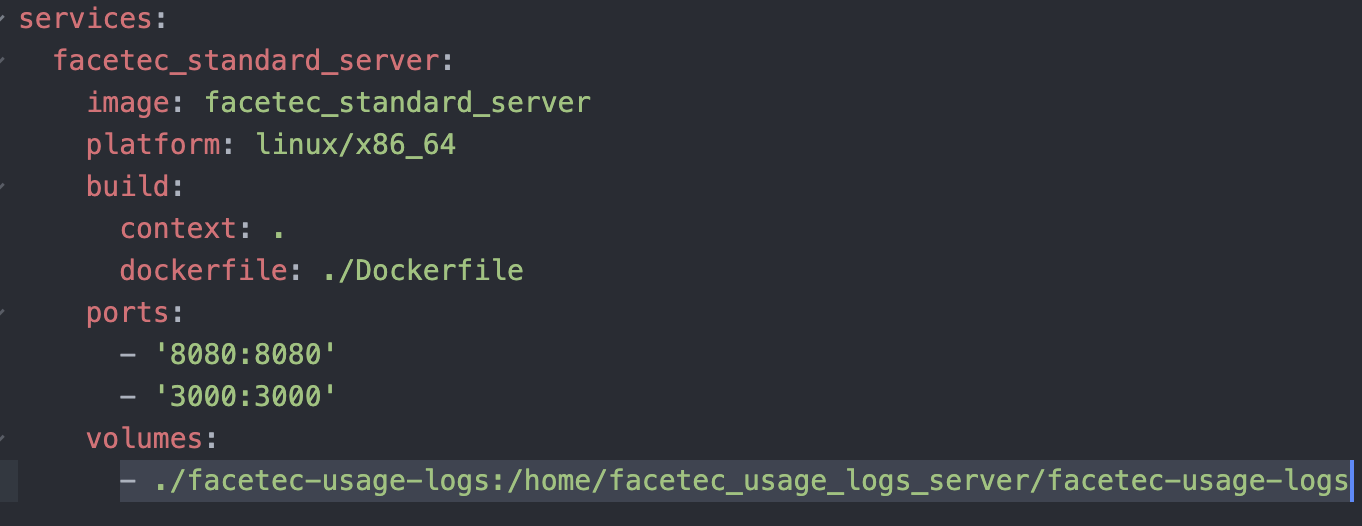
Usage log files must be written to a Persisted (Non-Ephemeral) File System so that FaceTec can upload any pending log data after an application restart. The use of an Ephemeral File System, such as a temporary disk or a disk inside of a virtualized container (e.g. Docker) that has not been mapped to a persisted disk on the host machine, is thus prohibited. You can check if a directory is persisted by using the "df -T" command in Linux (left image). Filesystems like 'tmpfs' and 'overlayfs' are not supported. By default, our Docker Compose Configuration (right image) maps the ./facetec_usage_logs directory to a local host directory so that any written files are written to the host machine's disk.
Using the "df -T" command in Linux

FaceTec Server's Docker Compose Configuration File (docker-compose.yml)
Running Multiple Usage Log Server Instances
Important Note: A single directory or shared volume cannot be used for multiple instances of the Usage Log Server. Each running Usage Log Server Instance must have its own unique directory. A Server Initialization Error may occur if Your Usage Log Server Instances are configured to use the same directory or shared volume.
Each running instance of Usage Log Server must have its own unique directory. Otherwise, the Usage Log Servers will interfere with each other and overwrite their corresponding logs. When running multiple instances with a shared volume, each volume must point to a different unique directory.
Specify a Host Path
Warning! FaceTec does not recommend making changes to the Host Path since direct storage of the Usage Logs is configured by default. Making any changes to the Host Path may cause problems in the configuration of Usage Log Server and prevent the FaceTec Server from running properly.
The path and directory name for Usage Logs can be defined underneath volumes in docker-compose.yml. The portion to the left of the : represents the entire path and directory name of the non-ephemeral log storage location:
volumes:
   - ./<PATH_ON_HOST_MACHINE>/facetec-usage-logs:/home/<PATH_IN_DOCKER_CONTAINER>/facetec_usage_logs_server/facetec-usage-logs
Specify a Docker Container Path
Warning! FaceTec does not recommend making changes to the Docker Container Path for Usage Logs. Making any changes to the Docker Container Path may cause problems in the configuration of your Usage Log Server and prevent the FaceTec Server from running properly.
The Docker Container Path for the Usage Logs is specified underneath usageLogsDirectory:.
usageLogsDirectory: "<PATH_IN_DOCKER_CONTAINER>"The name of the Usage Logs Directory is set to facetec-usage-logs and cannot be changed.