Architecture: Features & Configuration Options
The FaceTec Server Software runs 100% in YOUR Private Cloud inside YOUR Firewall. None of your User's Biometric Data or PII Information is sent to FaceTec.
Device SDK Features & Options
Compare the Device SDK properties for the 3D Liveness Check & 3D Face Re-Verification use cases.
| FaceTec Device SDK Features | 3D Liveness Check (No 3D Face Matching) | 3D Face Re-Verification (3D Matching + 3D Liveness ✓) |
|---|---|---|
| Device Compatibility | Android, iOS, Mobile Browsers, PWA & PC with Webcam | Android, iOS, Mobile Browsers, PWA & PC with Webcam |
| Biometric Data Stored | None, or On-Server (for Audit Trail) | Encrypted FaceMap Stored on Server |
| 3D Liveness Verified | Yes, On-Server | Yes, On-Server |
| 3D Face Re-Verification to Govt. Photo ID | Yes, with 3D:2D Photo ID Matching | Yes, with 3D:2D Photo ID Matching |
| 3D Face Re-Verification | Not Applicable | On-Server - 1:1 & 1:N (1/125M FAR @ <1% FRR) |
| Device SDK Download Size | iOS/Android: 3.9MB & Browser: 3.7MB | iOS/Android: 3.9MB & Browser: 3.7MB |
| Transmitted 3D FaceScan Size | ~350KB | ~350KB |
| Age Check (Anonymous) | Yes, on 3D FaceScans/Maps & 2D Images | Yes, on 3D FaceScans/Maps & 2D Images |
Testing API vs. Customer-Hosted FaceTec Server
Compare the FaceTec Server properties for the FaceTec Testing API & Customer Hosted FaceTec Server when in Production.
| Features & Options | FaceTec Testing API | Customer Hosted FaceTec Server/API |
|---|---|---|
| At HTTPS/In Transit Data | Encrypted | Encrypted |
| Biometric Storage | FaceTec Testing Cloud (AWS) | Customer’s Private Server / Cloud or User Device |
| Server/Cloud Software Required | None (all operations HTTPS API based) | FaceTec Server (provides private HTTPS API) |
| 1:N De-Duplication Check | For Testing/POC Only | Yes, new Users can be checked for dupes |
| Migration to the Other API | Yes, move from FaceTec’s Managed Testing API to your own FaceTec Server/API w/ a Device SDK Update | Not Applicable |
| Server Sample Code & Demo Apps | Yes, via HTTPS API | Yes, Java, Docker |
| Startup Effort | Sample apps pre-configured for immediate testing | FaceTec Server deploys quickly |
| Pricing Model | Free, For Initial Setup & Testing Only | Billed Per 3D Liveness Check Session/User |
Important Note: FaceTec only charges for 3D Liveness Checks and all other APIs and Features are FREE and available to all signed FaceTec Customers & Partners.
FaceTec Server Features
FaceTec Server Features.
| Customer Hosted FaceTec Server Features | FaceTec Server | Description |
|---|---|---|
| FaceTec Dashboard (only visible to Customer) | Available by Default | FaceTec's Dashboard is available for FREE to all signed Customers & Partners. |
| Usage Log Server | Required. See Usage Logs Policy for details. | Send anonymous non-PII usage logs for billing. |
| Databases Supported | In-Memory Stub DB, MongoDB, DocumentDB, SQL, and S3 | Other databases are supported via HTTPS API customization (examples provided). |
| Startup Effort | Minimal | Initial development deploys can be done in minutes using Docker. |
| Customization Level | Server core and HTTPS API | FaceTec Server provides an HTTPS API code that allows for deep customizations. |
| APIs Available | All APIs | All FaceTec APIs are included and available for all signed Customers & Partners. |
Private Cloud Architecture & Data Flow
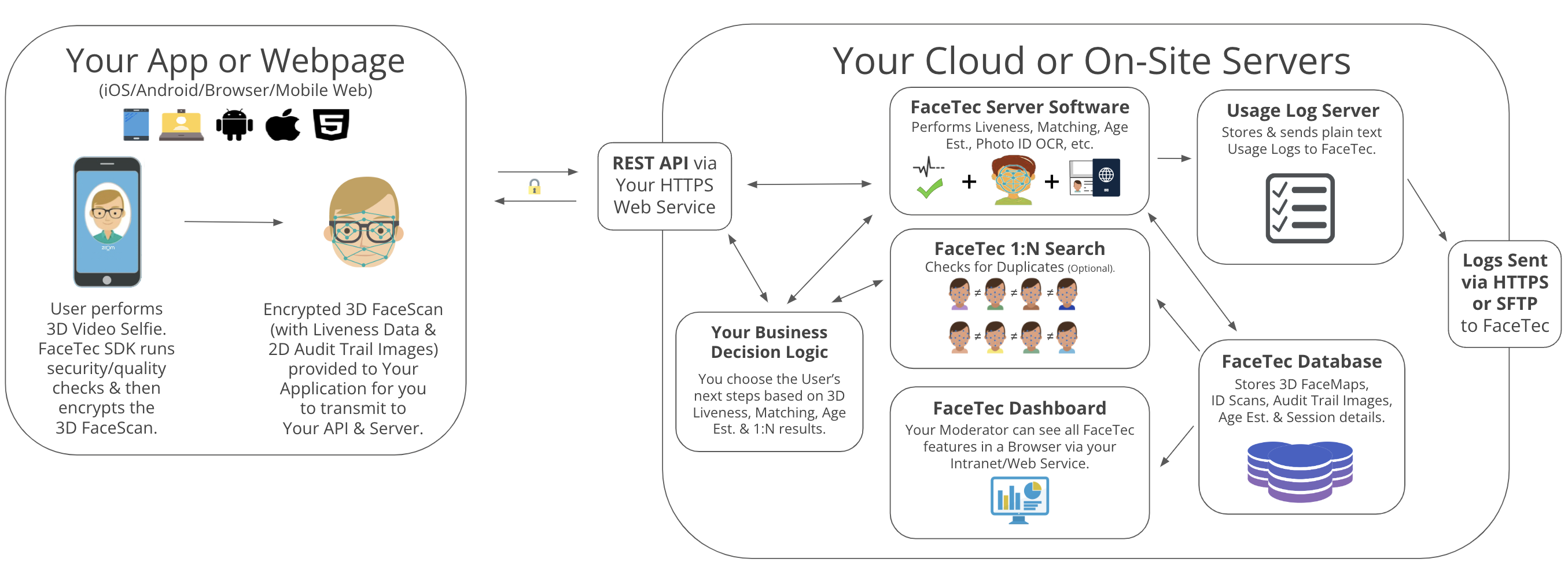
High-level overview of how 3D FaceScan data and ID Scans flow from your Users' devices to your Private Cloud.
Notes on Architecture & Data Privacy
FaceTec does NOT provide a Biometric Data Processing Service. FaceTec is a software you download, integrate, and run inside Your Private Cloud.
First, you download the FaceTec Device-Side SDKs and integrate them into Your Apps and/or Web Page.
Second, you download the FaceTec Server-Side software and configure it inside Your Private Cloud and Firewall.
Once in production, with permission from the User, your App and/or Web Page collects the User's 3D FaceScan and/or Photo ID Scan data.
The 3D FaceScan data is sent from the User's device directly to Your Private Cloud for processing by Your FaceTec Hosted Software and Database.
After processing the resulting Liveness-proven 3D FaceScans/Maps/IDScans can be stored in Your Database inside Your Private Cloud. (No information is stored on FaceTec's Servers).
FaceTec Software Features (KYC/IDV Dashboard, Database, 1:N Search, or any other feature) require no User Biometric Data or PII Information to be sent to FaceTec.
Important Note: No User's Biometric Data or PII information is ever sent to FaceTec once deployed in your Private Cloud/Servers.
Hardware/Performance Example
Private Cloud Server Configuration (Intel CPU): Cluster of 4 Servers running 8 or 16-core Intel Xeon Platinum 8000 Series CPUs
Private Cloud Server Configuration (AMD CPU): Cluster of 4 Servers running 8 or 16-core AMD EPYC 9000 Series CPUs
RAM for each Server: Number of CPUs * 2.5 GB of memory/RAM (e.g. an 8 CPU system has 20 GB of RAM; a 16 CPU system has 40 GB of RAM)
~2 3D Liveness Checks per second, per server (depending on configuration).
1:N Search for duplicates in a Database of 1,000,000 3D FaceMaps can be performed in under 1 second.
On AWS/Google, the cost for four 8 or 16-core machines is ~$4K - $10K annually.
Other additional costs to consider: Database and Storage for 3D FaceMaps/IDScans, Usage Logs, Transaction Logs, and Analytics.
Calculating Your Infrastructure Requirements
To double the requests/sec OR the geographic regions, multiply the required hardware by two.
To be resilient to load spikes, use auto-scaling for your hosted FaceTec Server with a service like AWS Elastic Beanstalk.
FaceTec Dashboard & Compatibility
The FaceTec Dashboard (Video Tour Here) shows FaceTec's usage from your Users as they perform 3D Liveness Checks, Enrollments, Verifications, Photo ID Matches, & Age Checks. Try the Developer Testing Dashboard Here.

FaceTec Dashboard
Hosted 100% inside Your Firewall through Your Private Cloud or Your On-Premise Servers.
Visible only to the internal staff you designate and never to FaceTec staff.
You secure the FaceTec Dashboard Web App (internal access controls, whitelists, etc.)
Closed-source Web App → You perform updates as FaceTec improves its software.
Must use FaceTec Server Managed SDK.
Databases supported: MongoDB/DocumentDB/CosmosDB and PostgreSQL.
Planned database support: Dynamo, MySQL/Aurora, & more.