MongoDB Walkthrough
Use this page to learn about the Mongo Database used by the FaceTec Server and Server Dashboard.
Prerequisite
Initial Database Setup Verification
After your FaceTec Server and Dashboard SDK are successfully configured to the same database, it is time to verify that they can store and load data.
The database will be created automatically when starting the FaceTec Server SD if it does not already exist. The collections will not be created until a successful Session is performed against your FaceTec Server. When a successful session is performed, the FaceTec Server will save the Session data into the Session collection of your configured Mongo Database.
After performing your first Liveness 3D or Enrollment 3D Session, your Database will have both a Session collection and a FaceMapHash with the required indexes to make its Database operations fast. Below is an example of how the Database may look:
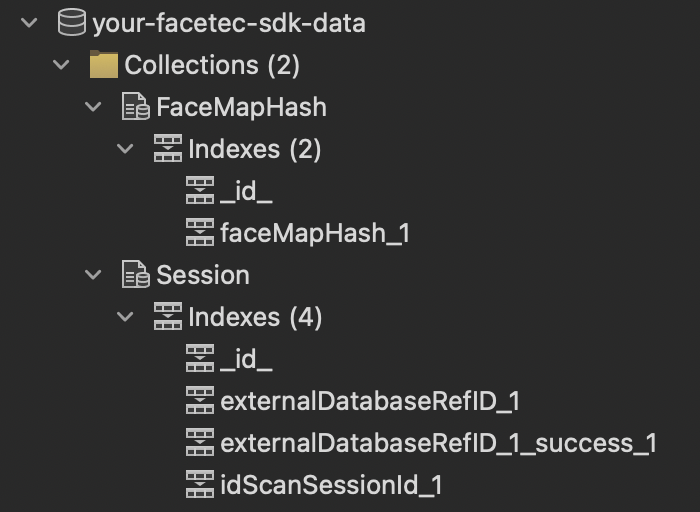
MongoDB Collections
The Session Collection stores all core objects like FaceMaps, Audit Trail Images, ID Scans, Photo ID Images, and Photo ID Crops, as well as all metadata related to the session.
The FaceMapHash collection stores a hash of each new FaceScan and is used for the Replay Check.
The IDScanHash collection stores a hash of each new IDScan and is used for the Replay Check.
MongoDB Database Indexes
FaceTec's Default MongoDB Implementation utilizes several indexes to speed up query performance and look-up times. Indexing is imperative for ensuring that FaceTec Session and Records can be retrieved in a timely manner.
Recommended Indexes
Below are the recommended database indexes for the v10 FaceTec SDK Database Collections:
- v10 Session Collection:
externalDatabaseRefID,externalDatabaseRefID.success,idScanSessionId,launchId, andSessionTypeKey. - v10 Session History Data:
LaunchIDKey. - v10 FaceMap Hash Collection:
FaceMapHashKey. - v10 Session Hash Collection:
SessionRequestHashKey.
MongoDB Commands for Indexing
The following MongoDB Commands can be used to ensure that FaceTec's Recommended Indexes are used in your team's MongoDB Database:
db.getCollection("Session").createIndex({ "externalDatabaseRefID": 1 }, { background: true })
db.getCollection("Session").createIndex({ "idScanSessionId": 1 }, { background: true })
db.getCollection("Session").createIndex({ "externalDatabaseRefID": 1, success: 1 }, { background: true })
db.getCollection("Session").createIndex({ "launchId": 1 }, { background: true })
db.getCollection("Session").createIndex({ "sessionType": 1 }, { background: true })

db.getCollection("SessionHistoryData").createIndex({ "launchId": 1 }, { background: true })
db.getCollection("FaceMapHash").createIndex({ "faceMapHash": 1 }, { background: true })
db.getCollection("SessionRequestHash").createIndex({ "sessionRequestHash": 1 }, { background: true })
While the FaceTec Server ensures that these indexes are used automatically, it is generally recommended to index the MongoDB Database before updating and launching the FaceTec Server.
The FaceTec Server ensures that indexing is performed in an asynchronous manner. This ensures that your team's MongoDB Database can still be used while indexing is being performed.
However, it should be noted that indexing is still a resource-intensive operation. Asynchronous Indexing can impede the performance of any concurrent queries that are performed, as well as result in temporary discrepancies in your team's replicated datasets. For these reasons, it is generally recommended that Indexing is performed during a non-peak traffic time when your team can monitor its status and ensure that it has completed before the FaceTec Server is updated.
MongoDB Session Records
The Session collection contains a record for each successful session.
To access 3D Liveness Checks (sorted by most recent) from the Database, you can query your records with the following command:
db.getCollection("Session").find({"callData.path": "/liveness-3d"}).sort({_id: -1})Standard properties contained by the Session Records:
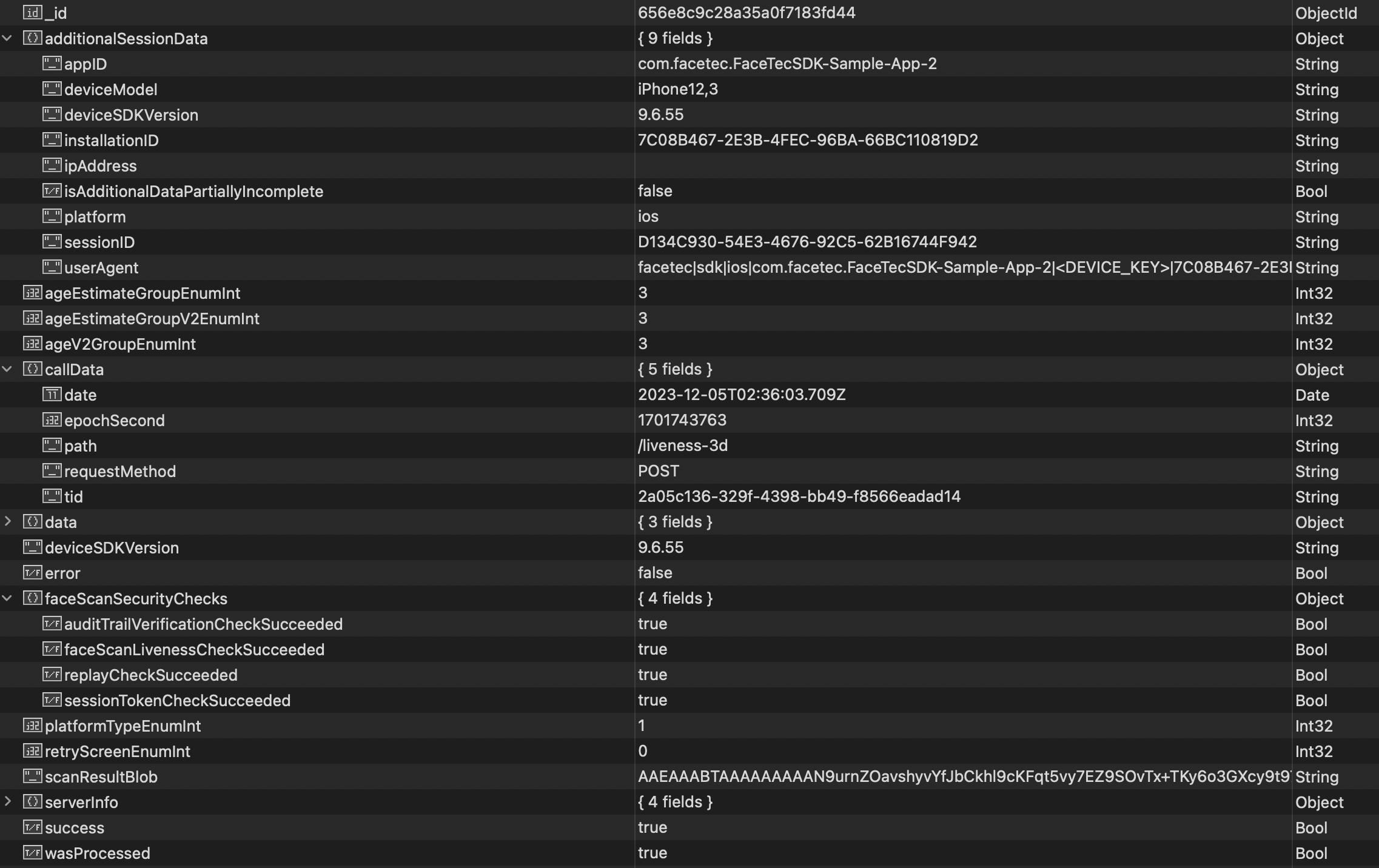
- AdditionalSessionData - Contains useful information from the client, such as the Device Model, Installation ID, and Platform.
- CallData - Contains information about when the Session was called and what type of Session it is.
- Data - Stores large objects like FaceScans, FaceMaps, ID Scans, and Photo ID Images.
- FaceScanSecurityChecks - Contains the additional security check results ran by the FaceTec Server, such as the Replay Check and Audit Trail Image Verification Check.
Here is an example record for a successful 3D Liveness Session.
Retrieving 3D FaceScans & ID Scans from MongoDB
The video below video shows how to retrieve a 3D FaceMap and an ID Scan using the externalDatabaseRefID to look up the reference data.
Important Note: The externalDatabaseRefID is 100% controlled by your business logic and code. FaceTec does not set this internally (but we do demonstrate how to set it in our samples). Setting & Retrieving the externalDatabaseRefID should be done in Server-Side Code, not your Device-Side code.