UR® Codes - Cryptographically Signed Biometric Barcodes
Important Note: The UR Encoder SDK has just been released! Please see the UR Code Developer Site for more details.
Introduction to UR Codes & Use Cases
They may look familiar, but these QR codes contain digitally signed, biometric data and enable privacy-preserving Identity Verification. UR Codes allow codeholders to prove, with high confidence, their legal identity, age, and right to access their accounts or privileges, both in-person and remotely. Because they store unique, signed face data, personal info, and legal identity data, UR Codes enable secure, low-cost, two-party identity verification at an unlimited scale.
UR Codes can be used in ANY identity-related scenario and from Any Issuing Authority (DMVs, passport issuers, schools, employers, etc.) to immutably bind Anyone to their Identity Data.
| UR® Driver License | UR® Passport | UR® Business Card | UR® Student ID |



UR Codes provide privacy-protecting, biometric security similar to that of e-Passports, but without the usability/durability problems or the exorbitant costs associated with scannable NFC chips. For more information on UR Codes, please see the FaceTec PDF Intro to UR Codes.
When a UR Code contains trusted data from a Legal Identity Issuing Authority and the digital signature is verified, it means the trusted biometric data is bound to the legal identity. This process is called Biometric Binding, and it is why Photo IDs have existed for nearly 100 years.
Typically, when your Identity is verified using your Physical Identity Document, another human will look at you and then at your document to decide if the document looks legitimate and if you match the face on the document. UR Codes work the same way, but instead of a human looking at your document and deciding whether it is real or not, UR Codes have a digital signature that verifies that the Identity Data was issued, as encoded, by the listed Issuing Authority.
Then, all you need to do is match your live 3D face, via a selfie, to the trustworthy biometric data that is in the UR Code, and just like that, you have established that you match the biometric data in the UR Code and the Identity Data, like the name, address, birth date, driver license number, and any other data personal to you, belongs to you.
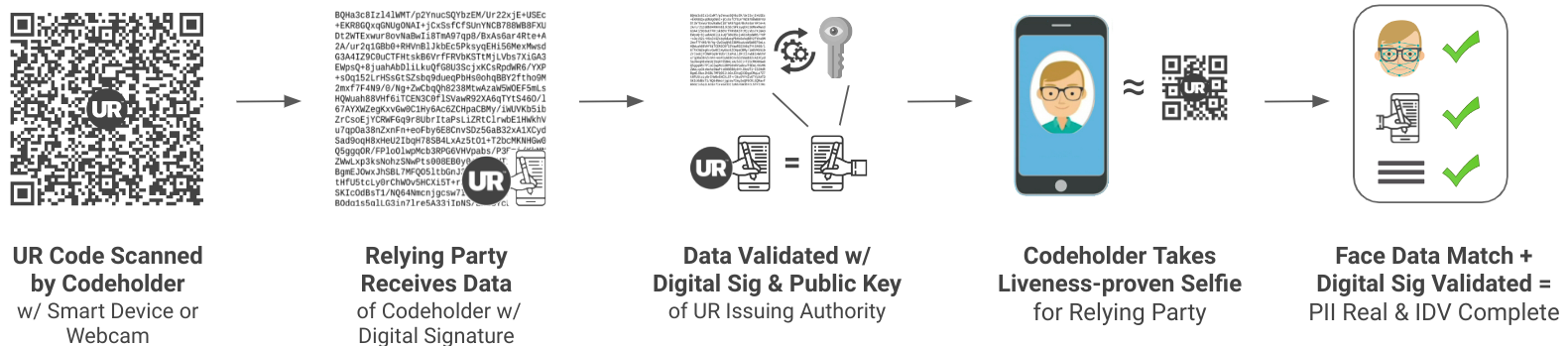
It is important that the newly collected biometric face data, the data that is going to be matched against the trusted face data previously stored in the UR Code, be collected from a Live Human User and that there is a very high degree of confidence it was collected in real-time from the Live Person. The process of “Liveness Detection” is critical to the security of the process, and Liveness must be established before the matching model can determine the likelihood that you are the right person.
UR Codes are generated by Issuing Authorities using secure encoding software that runs inside the firewall of those Issuing Authorities. Using a unique Public/Private Encryption Key pair, the software cryptographically signs each UR Code, making them provably immutable.
An Issuing Authority can be any organization that Relying Parties choose to accept Identity Data from. Ex. The DMV, the State Department, a School, or a Non-Profit.
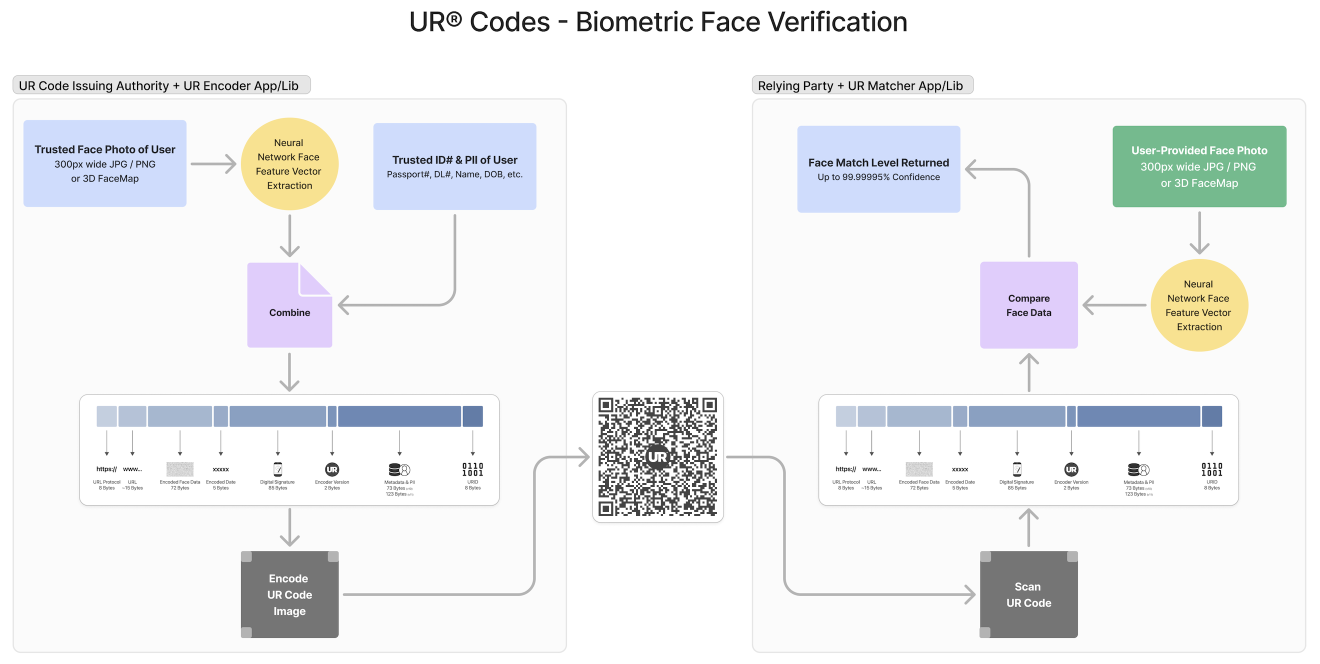
The Issuing Authority provides the identity information and the face photo of the person who is being issued the UR Code. A Digital Signature is derived and added to the data that is then encoded in the UR Code. This code can now be scanned with any smart device or webcam.

How are UR Codes Validated?
Look for the UR seal in the center of the code, then scan with a smartphone camera (or a webcam using the UR Code Scan+Match App or UR Code Scan+Match SDKs).

UR Codes contain a digital signature that can be used to verify the contents of a UR Code and to confirm that the UR Code originated from the appropriate Issuing Authority.
The Public Key for verifying the Digital Signature is hosted on the Issuing Authority's Website. For more information, please see the Public Key Distribution Guide.
UR Codes for Proving Age
Issuing Authorities can encode age data, such as birth date, birth month & year, or years of age at the time of encoding, along with trusted face data. During the Digital Signing Process, that data is fused together, and a UR Code is generated, which allows the codeholder to prove their age to Relying Parties who trust the Issuing Authority of that UR Code.
Offline UR Code Verification
Offline Functionality is available in the UR Code Scan+Match App. The UR Code Scan+Match App has its own QR and UR Code Libraries, as well as its own Public Key for UR Codes generated with the FaceTec UR Code Generator App. By using these resources, the UR Code Scan+Match App can operate in an offline capacity.
Important Note: Offline UR Code Verification is currenty not available in the FaceTec SDKs.
UR Codes Advantages vs. Legacy KYC?
For over a decade, online identity verification (IDV) has required users to upload a photo of their ID card or take a picture with their camera. Their sensitive, personally identifiable information (PII) usually goes to a third-party, Know-Your-Customer (KYC) service that literally guesses about the document's authenticity. This scheme is not suitable for the post-Gen AI world, and users, identity issuers, and relying parties are in dire need of a real long-term solution. Previously, the most notable attempt to address identity security has been the biometric e-Passport NFC chip, released in 2005. While secure, they are not widely used in typical ID documents because of usability and durability, as well as prohibitively high costs.
UR Codes store digitally signed, immutable face data and biometrically bind the codeholder to their identity data, while also being scannable by everyday devices. This privacy-protecting, biometric security technology empowers secure, two-party remote identity verification at an infinite scale.
| Feature | UR Codes | Legacy KYC | Notes |
|---|---|---|---|
| 2-Party Verification | ✅ | ❌ | UR Codes enable the User to prove their identity directly to any Relying Party |
| Tamper Proof | ✅ | ❌ | UR Codes are Tamper-Proof & Verified using Standard Cryptography |
| Strong 3D Liveness | ✅ | ❌ | While not required, UR Codes are tightly integrated with FaceTec's Industry-Leading 3D Liveness |
| Strong Face Matching | ✅ | ❌ | 3D:2D -- 1/2,000,000 FAR @ <1% FRR, 2D:2D -- 1/100,000 FAR @ <1% FRR |
| Universal Usability | ✅ | ❌ | Using UR Codes is as easy as Scanning a QR Code and then taking a selfie |
| Ubiquity | ✅ | ❌ | UR Codes can be scanned with All Modern Devices. All User Demographics already know how to Scan & Use QR Codes |
| NFC Chip Parity | ✅ | ❌ | UR Codes have Feature Parity with NFC Chips at 1/1,000th the Cost |
| Desktop & Laptop Webcam Support | ✅ | ❌ | NFC Not Supported in Browsers, while UR Codes are scannable on Low-Res Webcams |
| Mobile Browser Scans | ✅ | ❌ | NFC Not supported in Browsers |
| 100% OCR Accuracy | ✅ | ❌ | 100% Accurate, Structured Data is Read From the UR Code |
| Longevity | ✅ | ❌ | UR Codes use built-in Error Correction to avoid Scan Issues as Documents Age. With Legacy KYC, all aspects of Document Scans degrade over time (OCR, Matching, Spoof/Tamper Detection, NFC Chips, etc.) |
| Digital ID / mDL | ✅ | ❌ | UR Codes can be added to Digital IDs / mDLs. Legacy KYC Services have a vested interest in keeping End Users using physical IDs and Scans... |
| Unique Identifiers Across Document Types | ✅ | ❌ | The UR ID is a Consistent, Unique UUID for that UR Code |
| Offline Identity Verification | ✅ | ❌ | Offline UR Code Verification, 2D:2D Matching, 3D:2D Matching Supported |
UR Codes Technical Information
UR Codes Contents
The following shows the contents of UR Codes:
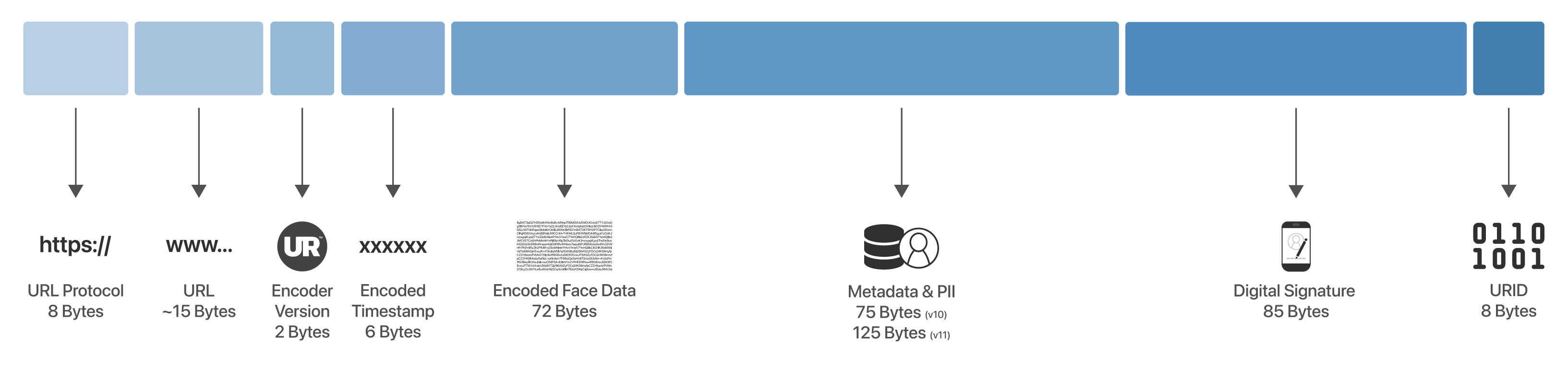
| UR Code Content | URL Encoded Size (Bytes) | Type | Notes |
|---|---|---|---|
| Digital Signature | 85 | ECDSA Signature | Ensures UR® Code is verifiable and cannot be tampered with |
| Encoded Face Data | 72 | Face Vector | For 2D:2D Matching |
| URL Protocol | 8 | "https://" prefix | Must be present to launch URL when scanned |
| URL Address | ~15 | String - App URL | The URL of Your Website |
| URID | 8 | String | Unique String for a specific UR Code |
| Encoded Timestamp | 6 | Timestamp Bytes (minified) | Creation Timestamp |
| Encoded Version | 2 | Version Bytes (minified) | Ensures UR Code Compatibility |
| Account#/PII/Metadata | 75-125 | Any Data | 75-125 Byte Capacity Depending on V10 or V11 QR Code |
| Total V10/V11 QR Capacity | 271/321 | Total Size Supported by QR | For Reference |
UR Codes Security Features
FaceTec uses Elliptic Curve Digital Signature Algorithms (ECDSA) to sign the contents of the UR Code with the UR Code Private Key. The UR Code is verified against the corresponding Public Key to verify the Digital Signature. This ensures the UR Code was generated by the owner of the Private Key corresponding to the Public Key and ensures the contents in the UR Code have not been modified.
FaceTec currently supports two curves for the Digital Signature embedded in UR Codes.
- The secp256k1 curve (the same curve used to secure Bitcoin, and referenced in NIST SP 800-186).
- The ed25519 curve (another curve recommended by NIST).
To learn more about these curves, please see UR Codes - Supported Curves.
It is also possible to support different curve types based on security opinions. However, most curves generate larger Digital Signatures, which could make the UR Code unusable due to the size of the code matrix required.
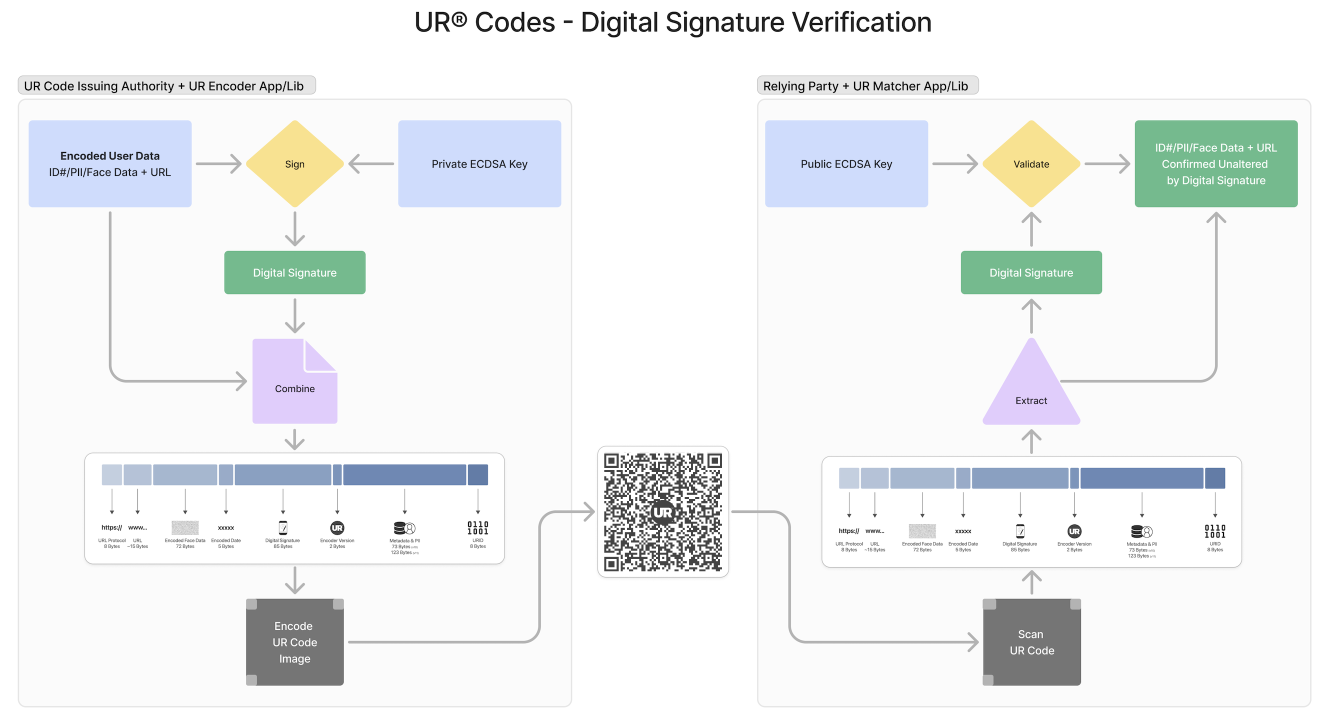
UR Codes Privacy-Preserving Design
UR Codes do not contain Face Image Data, making them superior (from a privacy perspective) to any solution that requires Face Images to be scanned, transmitted, processed, and stored.
The User PII/Metadata present in the UR Code can be encrypted for ultra-secure or ultra-private use cases. Note that in most IDV/KYC use cases, the User's PII/Metadata already exists in plain text on User Documents.
Metadata with Expiration or Issue Dates
Certain UR Codes, such as Driver Licenses and Passports, may have Metadata containing Expiration or Issue Dates. Relying Parties can use the Expiration and Issue Dates in their Business Logic to make specific decisions on how to process the Metadata.
Expiration Dates may be useful in determining if an Official Government Document or License is still valid.
Issue Dates may be relevant for setting the match thresholds for UR Code Images. As humans age, they will no longer match as highly against the face data from when they were younger.
Can UR Codes be Revoked by the Issuing Authority?
Yes, UR Codes that have associated privileges, such as Driver's Licenses and Passports, or UR Codes with identity data that has been legally changed (by marriage, for example) can be revoked by the Issuing Authority.
The process requires the Relying Party to check the URID # in the UR Code against the Issuing Authority's Revocation list, which can be done at the same time as and on the same URL as retrieving the Public Key for Digital Signature Validation. The UR Code Matcher Software can be configured to scan the Issuing Authority URL under /UR/Revoked_URIDs.txt, and if the URID is present on the list, then the Issuing Authority has revoked the UR Code associated with that specific URID.
Privacy is preserved by the Revocation List method because the presence of the URID on the Revocation List is used to determine if the UR Code has been revoked, not the legal name or permanent ID number.
Revoked lists can be used in conjunction with Expiration Dates to limit the need for expired UR Codes to be listed in the URID Revocation List.
Revocation Lists can also be used to remove the privileges of an individual represented in a UR Code, while still maintaining the ability to scan and match their face to the UR Code for identification purposes.
UR Codes 3D:2D & 2D:2D Face Verification & Matching Accuracy
Face Verification
UR Codes contain a tamper-proof representation of the User's Face that can be used for both 3D:2D and 2D:2D Matching. Because this representation is tamper-proof, the authenticity of the image this representation was derived from can be trusted.
This enables both Identity Issuers and Relying Parties to build verification systems to establish trust with UR codeholders. When a UR codeholder scans their UR Code, they can then be Matched to their UR Code.
To create a trust anchor, Identity Issuers and Relying Parties should perform a 3D Liveness Check, then perform 3D:2D Matching to the UR Code. The 3D Liveness Check proves that a Real Human User is performing the interaction, and the 3D:2D Match provides confidence that this is the same User as the trusted face data on the UR Code.
For less secure verifications, Identity Issuers and Relying Parties can Match 2D Images they gather from other sources and perform 2D:2D Matching to the UR Code. For instance, in Ticketing, Delivery, in-person Banking, or Border-security scenarios, this could be a 2D Image taken by a trusted 3rd Party using an App developed by your Organization. The 2D Image would be taken, then the 2D:2D Match provides confidence that this is the same User as the trusted face data on the UR Code.
Matching Accuracy
UR Codes store a mathematical representation of the User's Face as a 72-byte Face Vector.
FaceTec's Neural Networks are specially trained to achieve great performance despite the minuscule data size.
This API returns Match Levels up to 99.99995% (i.e. FARs up to 1 in 2,000,000 @ <1% FRR).
Match Levels 0 through 9 are returned. Match Level 9 is the maximum Match Level for 3D:2D Matching, and Match Level 6 for 2D:2D.
Match Level 9 - 99.99995% (1/2,000,000 FAR, Maximum Match Level for 3D:2D UR Code Matching)
Match Level 8 - 99.9999% (1/1,000,000 FAR)
Match Level 7 - 99.9998% (1/500,000 FAR)
Match Level 6 - 99.999% (1/100,000 FAR, Maximum Match Level for 2D:2D UR Code Matching)
Match Level 5 - 99.99% (1/10,000 FAR)
Match Level 4 - 99.9% (1/1,000 FAR)
Match Level 3 - 99.8% (1/500 FAR)
Match Level 2 - 99.6% (1/250 FAR)
Match Level 1 - 99% (1/100 FAR)
Match Level 0 - Non-match
Please see this whitepaper for more details about FaceTec's Dataset and Testing Methodologies.
UR Codes 2D Image Guidelines
UR Code 3D:2D and 2D:2D Matching Performance is directly impacted by the quality and style of the images used to create UR Codes. Whenever possible, the highest quality 2D Images should be used.
Requirements for creating UR Codes from 2D Images:
- JPEG or PNG. No other image formats are accepted.
- Only one face must be present in the image.
Recommendations for optimal performance:
- Face has a frontal pose, mugshot style. Variations in pitch, roll, and yaw will lead to poor accuracy.
- Face should be generally centered in the image. This is not a requirement, but it is helpful for performance.
- Face width should be at least 150 pixels wide, ideally 300+ pixels wide. Smaller faces are sometimes accepted, but their use will degrade accuracy.
- Images containing glare, watermarking, or holograms can negatively affect accuracy.
- Images should not be heavily compressed, and ideally, not compressed more than once.
- Face images should be upright. FaceTec SDKs will detect 90, 180, and 270-degree rotated faces in images, but processing will be faster if the photo is upright.
- In general, images having at least the quality specified in the ISO 19794-5 Frontal Face Specification will yield better performance.
- Neutral expression.
- Evenly-lit face, minimizing shadows and glare/reflections off eyeglasses.
The ICAO Standards provide guidance for improved accuracy:
- Color photo
- Clear with continuous-tone quality
- Full face, front view, eyes open
- Present full head from the top of the hair to the bottom of the chin
- Head centered in the frame
- The background should be plain white or off-white
- No distracting shadows on the face or background
- Head coverings are not recommended
- Neutral expression
Matching Accuracy is always impacted by the quality of the face data, so please be sure to submit the best possible photo. Here are some factors that can negatively impact performance:
- Image alterations, filters, face morphing, compression, upscaling, re-saving.
- Extreme pose or angle variations.
- Low-resolution, blurry, or otherwise low-quality images.
- Matching Users wearing sunglasses or face masks is not supported.
- Other extreme conditions, like extreme lighting, extreme facial expressions, or other extreme artistic alterations.
- Homogeneous datasets, Matching against close relatives, and contrived testing with known look-alikes.
Implementing UR Codes
The Facetec Server's UR Code APIs should only be used for Trial and Testing Purposes. Access to these APIs can be requested via a Support Request.
For all other Use Cases, the UR Encoder SDK should be used instead. Please see the UR Code Developer Site for more information on the UR Encoder SDK.
Generating a Secp256k1 Public/Private Key Pair
Private Key:
openssl ecparam -genkey -name secp256k1 | openssl pkcs8 -topk8 -nocrypt -out secp256k1_private_key.pemPublic Key:
openssl ec -pubout -in secp256k1_private_key.pem -out secp256k1_public_key.pemGenerating an Ed25519 Public/Private Key Pair
Private Key:
openssl genpkey -algorithm ed25519 -out ed25519_private_key.pemPublic Key:
openssl pkey -in ed25519_private_key.pem -pubout -out ed25519_public_key.pemConfiguring the UR Code Private Key
Use FaceTecInitializationConfig.urCodeSignaturePrivateKey (String) to configure your ECDSA Private Key. FaceTec is working on enhanced configuration options for Private Key Security for the initial release of UR Codes.
POST /create-ur-code-from-2d-image
Creates a UR Code from a 2D Image.
Parameters
images: Array of Base64 Images
url: String
metadataJSON: String
urCodeOutputUseTransparency: Boolean
Core Response Properties
urCodeCreationProcessingStatusEnumInt: FaceTecURCodeCreationProcessingStatus
0 = UR_CODE_CREATED_SUCCESSFULLY1 = UNSUCCESSFUL_CHECK_2D_IMAGE_PROCESSING_STATUS2 = UNSUCCESSFUL_DUPLICATE_IMAGE_DETECTED3 = UNSUCCESSFUL_INVALID_UR_CODE_URL4 = UNSUCCESSFUL_UR_CODE_TEMPLATE_MISSING_OR_INVALID5 = UNSUCCESSFUL_UR_CODE_SCHEMA_MISSING_REQUIRED_FIELD
urCodeString: String — The full URL that is stored on the UR Code but optimized so that URL encoding is not needed. This helps decrease the overall size of the UR Code.
urCodeImage: Base64 Image — The UR Code as a PNG in Base64 format. The UR Code is returned as a lossless PNG to provide the highest quality image that is optimal for scanning. The resolution of the UR Code is provided at 1920x1920.
urid: String — A Unique Identifier for a UR Code.
Behavior
- Pass in a 2D image, URL, and metadata, and creates/returns the UR Code Image and the full URL String that is encoded into it.
- The UR Code contains the Digital Signature of the UR Code data itself, signed by the UR Code Private Key.
POST /verify-ur-code
Verifies a UR Code and returns information from it. UR Codes are verified by using the Public Key, the UR Code Data, and the Digital Signature to ensure the UR Code has not been tampered with and was created by the owner of the Public Key.
Parameters
urCodeString: String -- The exact contents of the UR Code.
Core Response Properties
urCodeDataVerified: Boolean — True if the URID was verified, and the UR Code Data was verified against the signature.
metadataJSON: String — The metadata stored on the UR Code.
Behavior
- The metadata stored in the UR Code is returned.
- A UR Code is verified if the UR Code digital signature was validated by the Public Key and the digital signature matches the UR Code data.
POST /verify-ur-code-image
Verifies an image of a UR Code and returns information from it. UR Codes are verified by using the Public Key, the UR Code Data, and the Digital Signature to ensure the UR Code has not been tampered with and was created by the owner of the Public Key.
Parameters
urCodeImage: Base64 Image — A base64 JPEG or PNG image of a UR Code.
Core Response Properties
urCodeDetectedInImageStatusEnumInt: FaceTecURCodeDetectedInImageStatus
0 = UR_CODE_FOUND1 = UNABLE_TO_DETECT_UR_CODE_IN_IMAGE2 = UNABLE_TO_DECODE_IMAGE
metadataJSON: String — The metadata stored on the UR Code.
urCodeString: String — The full URL that is stored on the UR Code but optimized so that URL encoding is not needed. This helps decrease the overall size of the UR Code.
urCodeDataVerified: Boolean — True if the UR ID was verified, and the UR Code data was verified against the signature.
urid: String — A Unique Identifier for a UR Code.
Behavior
- The metadata stored in the UR Code is returned.
- A UR Code is verified if the UR Code digital signature was validated by the Public Key and the digital signature matches the UR Code data.
POST /match-3d-2d-ur-code
Matches a UR Code to a 3D FaceMap (retrieved by using externalDatabaseRefID).
Parameters
externalDatabaseRefID: String (More Information)
urCodeString: String — The exact contents of the UR Code.
minMatchLevel: FaceTecMatchLevel — Supported Match Levels are 0-9
Core Response Properties
success: Boolean — True if the UR Code Data was verified, the digital signature was verified, and the Match Level was at least minMatchLevel.
urCodeDataVerified: Boolean — True if the UR ID was verified, and the UR Code data was verified against the signature.
metadata: String — The metadata stored on the UR Code. This will be returned in all caps as FaceTec compresses the data to decrease the size of the UR Code
matchLevel: FaceTecMatchLevel — Supported Match Levels are 0-9
Behavior
- success is true if the UR Code Data was verified, the digital signature was verified, and the Match Level was at least minMatchLevel.
POST /match-2d-2d-ur-code
Matches a UR Code to a 2D Image.
Parameters
image: Base64 Image — A base64 JPEG or PNG used to match against the face data in the UR Code.
urCodeString: String — The exact contents of the UR Code.
minMatchLevel: FaceTecMatchLevel — Match Levels 1 - 6 can be specified.
Core Response Properties
success: Boolean — True if the UR Code data was verified to be the correct format, the digital signature was verified, and the Face Image matched with one of the Encoded Face Images with minMatchLevel or higher.
urCodeDataVerified: Boolean — True if the URID was verified and the UR Code Data was verified against the signature.
metadataJSON: String — The metadata stored on the UR Code.
matchLevels: Array of FaceTec Match Levels — Supported Match Levels are 0-6
urCode2DImageProcessingStatus: FaceTecURCodeCreationProcessingStatus
0 = UR_CODE_CREATED_SUCCESSFULLY1 = UNSUCCESSFUL_CHECK_2D_IMAGE_PROCESSING_STATUS2 = UNSUCCESSFUL_DUPLICATE_IMAGE_DETECTED3 = UNSUCCESSFUL_INVALID_UR_CODE_URL4 = UNSUCCESSFUL_UR_CODE_TEMPLATE_MISSING_OR_INVALID5 = UNSUCCESSFUL_UR_CODE_SCHEMA_MISSING_REQUIRED_FIELD
urid: String — A Unique Identifier for a UR Code.
Behavior
- success is true if the UR Code Data was verified, the digital signature was verified, and the FaceImage matched with one of the Encoded Face Images with minMatchLevel or higher.
POST /set-ur-code-public-key-map
Specifies the Public Keys that can be used to validate the UR Code’s Digital Signature. The UR Code Public Key Map is set by providing a JSON of URLs to validate, and for each URL, a list of the valid Public Keys to use for Digital Signature Validation. When a UR Code is scanned, the URL from the UR Code is used to look up the Public Key(s) specified in the Public Key Map to try and validate the UR Code.
For more information, please see the UR Code Public Key Map.
Parameters
urCodePublicKeyMap: JSON Object — A JSON Object containing the map of URLs and their associated public keys.
Core Response Properties
success: Boolean — True if the public key map was set.
Behavior
- success is true if the public key map was set.
UR Code Testing
Test-Only UR Codes can be encoded with the UR Encoder Demo (encode.urcodes.com), which will load as ur.co/?c=<UR_CODE_DATA> when scanned/processed.
UR Codes intended for Real-World Usage can be generated with the UR Encoder SDK. UR Codes generated with the UR Encoder SDK are signed with Your Organization's Private Key to ensure their validity and integrity. To get started with the UR Encoder SDK, please see the UR Encoder Setup Guide.
UR Codes generated via either of the means above can be scanned with the UR Code Scan+Match Application. The UR Code Scan+Match Application provides an interface to scan UR Codes and match them against 2D Images.
UR Codes Public Key Distribution
An Issuing Authority must first generate a Secp256k1 Public/Private Key Pair or an Ed25519 Public/Private Key Pair. Once the Public/Private Key Pair has been generated, the Issuing Authority shares the Public Key via their account in dev.urcodes.com, as well as the Domain they will use to host the Public Key.
Important Note: Only the Public Key is uploaded to dev.urcodes.com. Private Keys should NEVER be shared and are solely managed by the Issuing Authorities.
To ensure the integrity of the Public Key before it is distributed, FaceTec signs the Public Key with FaceTec's own Private Key. Once the Public Key has been signed, the Issuing Authority hosts the FaceTec-Signed Public Key on their Domain, so Relying Parties can easily access the Public Key and verify the contents of the UR Codes.
After the FaceTec-Signed Public Key has been added to the Issuing Authority's Domain, the Issuing Authority requests for Key Verification on dev.urcodes.com. FaceTec verifies that the key is being hosted on the same domain specified by the Issuing Authority and then validates the signature of the key. Once this process has been completed, the Public Key is then verified and ready for distribution.
UR Codes - Additional Features & Specifications
Multi-Face UR Codes for Shared Accounts
UR® Codes can store enough data so that two people can have their faces encoded, and they can be digitally signed. This allows the biometric binding to join two people together, such as business partners, married spouses, parents & children, and many other joint custody and dual ownership scenarios.
More info Coming Soon.

Verifying UR Code Digital Signatures With Your Own Cryptography
FaceTec's UR Code Verification Function is a convenience function that uses standard cryptography to verify the UR Code Data and the digital signature using the UR Code Public Key.
FaceTec encourages Partners & Customers to perform their own cryptographic verification of UR Codes to prove that cryptographic operations are correct.
FaceTec also provides OpenSSL sample code and a sample NodeJS App that demonstrates cryptographic verification of UR Codes using 100% open source tools and code.
Extracting the Digital Signature from the UR Code:
/verify-ur-code returns the UR Code Digital Signature as text. The Digital Signature can be saved and verified using standard cryptography libraries.
UR Codes are an open format, and the Digital Signature can be retrieved via parsing. FaceTec provides a command-line script in the FaceTec Server to demonstrate how to extract the Digital Signature using parsing.
./extract_signature_from_ur_code.sh UR_CODE_DATA.txt > UR_CODE_SIG.txtVerifying a UR Code Digital Signature using OpenSSL:
The example below shows how to use OpenSSL to verify the UR Code Digital Signature:
openssl dgst -verify UR_CODE_KEY.pub -keyform PEM -sha256 -signature UR_CODE_SIG.txt -binary UR_CODE_DATA.txtUR Code Specifications
Scope: Cryptographically Signed Biometric 2D Barcodes
Functional Requirements: Smart Devices & Webcam Native, Opens URL, 2-Party IDV
Tech Requirements: ISO/IEC 18004:2015 - QR Code barcode symbology specification
Dimensions & Print Quality: ¾” x ¾” or 2cm x 2cm @ 300 DPI
Error Correction %: Up to 7% of data loss can be corrected
Character Sets: Latin-1 - Alphanumeric + Special Characters
Face Matching Accuracy: 2D:2D = 1/100,000 FAR | 3D:2D = 1/2,000,000 FAR | 3D:3D = 1/125m
Face Matching Algorithms: FaceTec: 2D:2D, 3D:2D, & 3D:3D NN Models
Barcode Print Area: AAMVA DL/ID:2020 - Annex A, A.7.6 Zone 4 a/o 5
Security Features: Digital Sig. verification with Pub. Key, logged hash & internal checksum
Vendor Lock-In: No, supports all 2D face images & universal QR scanners
“UR” is a registered trademark of FaceTec, Inc. in the UK & EU.
Patent Pending.