Android Build Assistance
Use this guide to learn more about how to detect and resolve specific Android Build Behaviors.
Behavior: Android Gradle & ProGuard Builds aren't working.
Likely Cause: Versions of Gradle older than v7 exhibit a bug where minify tools like ProGuard remove FaceTec SDK even though the ProGuard rules specify otherwise. This may manifest as an error in build logs containing the words "Gradle", "dex", and/or "multidex".
Resolution: Use the Latest Gradle Plugin. v7.3.1 and above are confirmed to not have this behavior.
Security Note: Upgrading Gradle is a good practice, as it can resolve many other Security, Compatibility, and Performance-related behaviors in your application. (Link) (Link)
Behavior: Android App Compiles with Errors because it needs AndroidX.
Likely Cause: Both the Android Support Libraries and Jetifier in the FaceTec Android SDK utilize AndroidX. Depending on the current state of your app, this might cause compilation warnings or errors.
Resolution: Our Customers and Partners who have come to us with these questions/behaviors have all found it very easy to use the tools and resources below to fix their apps.
Google’s recommendation: "We recommend using the AndroidX libraries in all new projects. You should also consider migrating existing projects to AndroidX as well."
Google supports a tool to fix existing apps that are experiencing this behavior — it is called Jetifier. For more information:
Behavior: Android Application returns an Out-Of-Memory Error when disabling Large Heaps
Likely Cause: The FaceTec Android Device SDK requires Heap Memory for some of its features and operations. If your team's application uses a significant amount of Heap Memory, then a Large Heap may be necessary to ensure that enough Heap Memory is allocated. By setting android:largeHeap="false", your team's application may be prevented from allocating enough Heap Memory, which leads to an Out-Of-Memory Error.
Resolution: Your team's application should not explicitly disable Large Heaps (i.e. it should not set android:largeHeap="false"). Larger Android Applications and Android Applications that include several libraries, media components, and/or memory-intensive features may require more Heap Memory. This additional Heap Memory may be necessary to support other features and components in your team's application when they are used alongside the FaceTec Android Device SDK.
While allowing Large Heaps in your team's application can lead to higher memory utilization, this is generally considered an acceptable trade-off for larger applications that would otherwise be at risk of not having enough memory allocated.
Important Note: Large Heaps should be allowed to ensure that enough memory is allocated. However, a Large Heap should not be used as mechanism to fix Memory Leaks or to compensate for Unbounded Memory Growth in your team's application. Your team should still resolve any Memory Leaks and Unbounded Memory Growth that is identified in your team's application.
Behavior: General Build Issues with the Sample App or after Integrating the FaceTec Android SDK into Your App
Likely Cause: These issues are likely the result of having an old version of Android Studio, an old cache file, or an improperly synced Gradle file.
Resolution: These issues can often be resolved by doing the following:
- Update Android Studio to the latest version: Android Studio --> Check for Updates.
- Invalidate Caches: File --> Invalidate Caches.

- Sync Gradle: File --> Sync Project with Gradle Files.
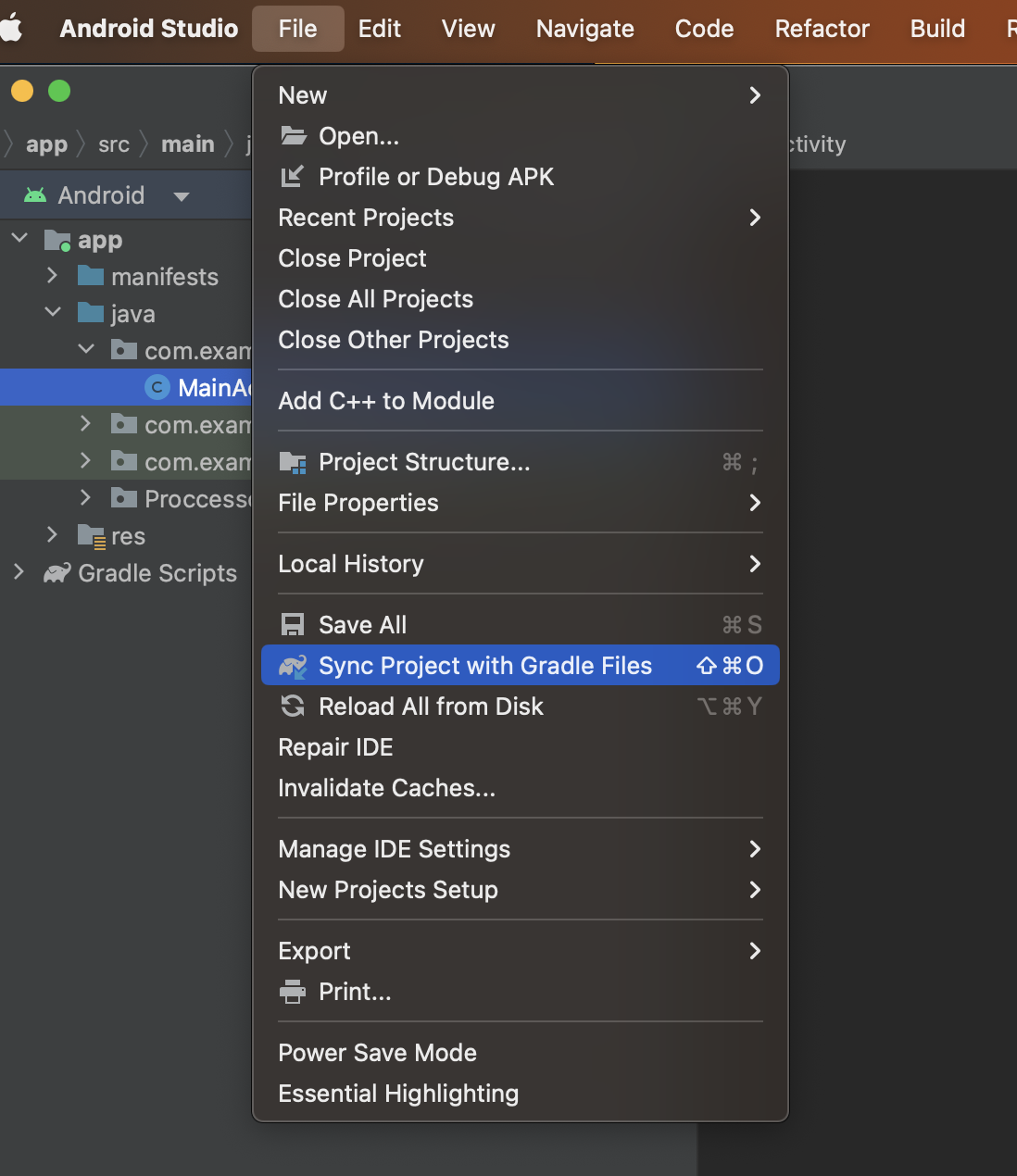
- Clean and Rebuild Project: Build --> Clean Project/Rebuilt Project.