Barcode & NFC Chip Scanning
FaceTec's ID Scanning includes Barcode Reading and NFC Chip Scanning. These features provide Enhanced Security Benefits and Additional Data that can be used within Your Team's IDV & KYC System.
Barcode Reading and NFC Chip Scanning are FREE to use and unlimited for all Customers & Partners.
To learn more about 3D:2D Matching with NFC Images, please see 3D:2D Face Portrait/NFC Matching.
Barcode Reading
FaceTec's ID Scanning supports Barcode Reading for documents that match a FaceTec Official or Custom OCR Template. The Barcode Data is highly dependent on the ID Type and the Barcode itself. FaceTec always returns the raw data read from the Barcode. FaceTec also provides parsed data if the format of the Barcode is a known type (current known types are USA/Canada Driver License PDF417 AAMVA Format, as well as the Argentina and South Africa National ID Card PDF417 formats).
Supported Barcode Formats
FaceTec's ID Scanning supports the following Barcode Formats:
- PDF417
- QRCode
- Aztec
- Codabar
- Code39
- Code93
- DataBar
- DataBarExpanded
- DataMatrix
- EAN8
- EAN13
- ITF
- MaxiCode
- UPCA
- UPCE
Barcode Reading Status
The Barcode Reading Status (FaceTecBarcodeStatus) can be found in barcodeStatus, which is returned as a property in both the ID Scan Only Result Object and the 3D:2D Photo ID Matching Result Object.
The table below lists the different Enumeration Values for the Barcode Reading Status (FaceTecBarcodeStatus):
| Value | Name | Description |
|---|---|---|
| 0 | NO_BARCODE_SPECIFIED_BY_TEMPLATE | No Barcodes were specified in the OCR Template. |
| 1 | BARCODE_REQUESTED_BUT_NOT_FOUND | A Specified Barcode was not found. This can occur in one of two cases:
|
| 2 | BARCODE_REQUESTED_BUT_ERROR_READING | All Specified Barcodes were found, but there was an unexpected behavior decoding at least one of them. This can occur in one of two cases:
|
| 3 | SUCCESS | All Specified Barcodes were read successfully, and at least one of the two Barcodes could be parsed. This can occur in one of three cases:
|
| 4 | BARCODE_REQUESTED_AND_READ_BUT_COULD_NOT_PARSE | The Specified Barcode was detected, the raw data was successfully extracted, but could not be parsed into fields for convenient access due to the raw data being in an unknown format. For rare documents with multiple Barcodes, this can occur in one of two cases:
|
Retrieving Barcode Data
The data retrieved from the Document's Barcodes is returned in documentData.barcodeValues and documentData.barcode2Values. The Barcode Data that is retrieved by FaceTec is highly dependent on the ID Type and the Barcode itself.
If the Barcode Data is in a known and parseable format, then FaceTec returns both the parsed data and the raw data read from the Barcode. The Parsed Barcode Data can be accessed in documentData.barcodeValues.extractedInfo and documentData.barcode2Values.extractedInfo.
If the data cannot be parsed, then FaceTec only returns the raw data read from the Barcode. The Raw Barcode Data can be accessed in documentData.barcodeValues.rawData and documentData.barcode2Values.rawData.
Important Note: Certain Factors, such as Document Damage, Ink Fading, Extreme Lighting, and Poor Camera Resolution, may impact performance or prevent the Barcode from being read successfully.
NFC Chip Scanning
FaceTec's ID Scanning supports NFC Chip Scanning for documents with an NFC Chip that match a FaceTec Official or Custom OCR Template. Some data stored in the NFC Chip may be dependent on the Country/Chip being used. FaceTec always returns the raw data read from the NFC Chip. FaceTec also provides the parsed data if the NFC Chip Data is in a known and standardized format.
NFC Support
Documents with an NFC Chip usually have the “biometric symbol” on them.

FaceTec supports NFC Scanning on all known ICAO-compliant ePassports and eID Cards that have this "biometric symbol" and match a FaceTec Official or Custom OCR Template.
NFC Scanning Status
The NFC Scanning Status (FaceTecNFCStatus) can be found in nfcStatus, which is returned as a property in both the ID Scan Only Result Object and the 3D:2D Photo ID Matching Result Object.
The table below lists the different Enumeration Values for the NFC Scanning Status (FaceTecNFCStatus):
| Value | Name | Description |
|---|---|---|
| 0 | NO_NFC_SPECIFIED_BY_TEMPLATE | The OCR Template did not specify the NFC Data. |
| 1 | NFC_REQUESTED_BUT_DEVICE_NOT_CAPABLE | The OCR Template specified the NFC Data, but the device could not process it. This can occur when the device is incapable of processing NFC Data or the app being used is not configured to use NFC Data. |
| 2 | NFC_REQUESTED_BUT_USER_PRESSED_SKIP | The OCR Template specified the NFC Data, but the user chose to skip the step and prevent the device from reading the NFC Data. |
| 3 | NFC_REQUESTED_BUT_ERROR_ACCESSING_CHIP | The OCR Template specified the NFC Data, but there was an unexpected behavior processing it. This can occur when there is interference from another device or object, the NFC Chip is out-of-range, or if the NFC Chip is damaged. |
| 4 | SUCCESS | The OCR Template specified the NFC Data, and the NFC Data was successfully read from the ID. |
| 5 | NFC_REQUESTED_BUT_ERROR_READING_MRZ | The OCR Template specified the NFC Data, but there was an unexpected behavior reading the MRZ. This can occur when there is a glare on the ID Card, the MRZ is partially obstructed, or the MRZ is damaged. |
| 6 | NFC_WILL_BE_REQUESTED | The OCR Template specified the NFC Data, but the ID Scan Step for reading and processing the NFC Data has not been reached. |
NFC Authentication Status
Some ePassport chips provide the following Authentication Mechanisms for NFC Clone Detection:
- Chip Authentication (CA)
- Active Authentication (AA)
If an Authentication Mechanism is supported, then the FaceTec iOS and Android SDKs will use it for NFC Clone Detection. If both Authentication Mechanisms are supported, then the FaceTec iOS and Android SDKs will use both mechanisms.
The NFC Authentication Status (FaceTecNFCAuthenticationStatus) from running these Authentication Mechanisms can be found in nfcAuthenticationStatus.
The table below lists the different enumeration values for the NFC Authentication Status (FaceTecNFCAuthenticationStatus)
| Value | Name | Description |
|---|---|---|
| 0 | NOT_APPLICABLE | NFC Clone Detection was impossible because the NFC Scan was not performed. |
| 1 | NOT_SUPPORTED_BY_DOCUMENT* | NFC Clone Detection was impossible because the Document did not have an NFC Scan feature. |
| 2 | NOT_SUPPORTED_BY_SDK | NFC Clone Detection was impossible because the FaceTec SDKs could not process the NFC Authentication Mechanisms. |
| 3 | FAILED | NFC Authentication Mechanisms were used, but the authentication itself failed. It was determined that the chip may not be a genuine NFC Chip or it may be a copy of the original. |
| 4 | AUTHENTICATED | NFC Chip Authentication and Signature Verification were performed successfully. The NFC Chip appears to be genuine. |
| 5 | FAILED_DUE_TO_SIGNATURE_VERIFICATION | NFC Chip Authentication was performed successfully, but the Document's Signature Verification failed. |
* Important Note: Many documents with an NFC Chip do not support Clone Detection. If NFC Clone Detection is not supported, then FaceTec will return NOT_SUPPORTED_BY_DOCUMENT.Retrieving NFC Data
The data retrieved from the NFC Chip Scanning is returned in documentData.nfcValues. The NFC Chip Data that is retrieved by FaceTec is dependent on the Country/Chip.
If the NFC Chip Data is in a known and parseable format, then FaceTec returns both the parsed data and the raw data. The Parsed NFC Chip Data is listed as separate fields in documentData.nfcValues.
If the data cannot be parsed, then FaceTec only returns the raw data read from the Barcode. The Raw Barcode Data can be accessed in documentData.nfcValues.rawData.
Retrieve the NFC Image
When processing an NFC Scan, an NFC Image can be retrieved from the extractedNFCImage Field.
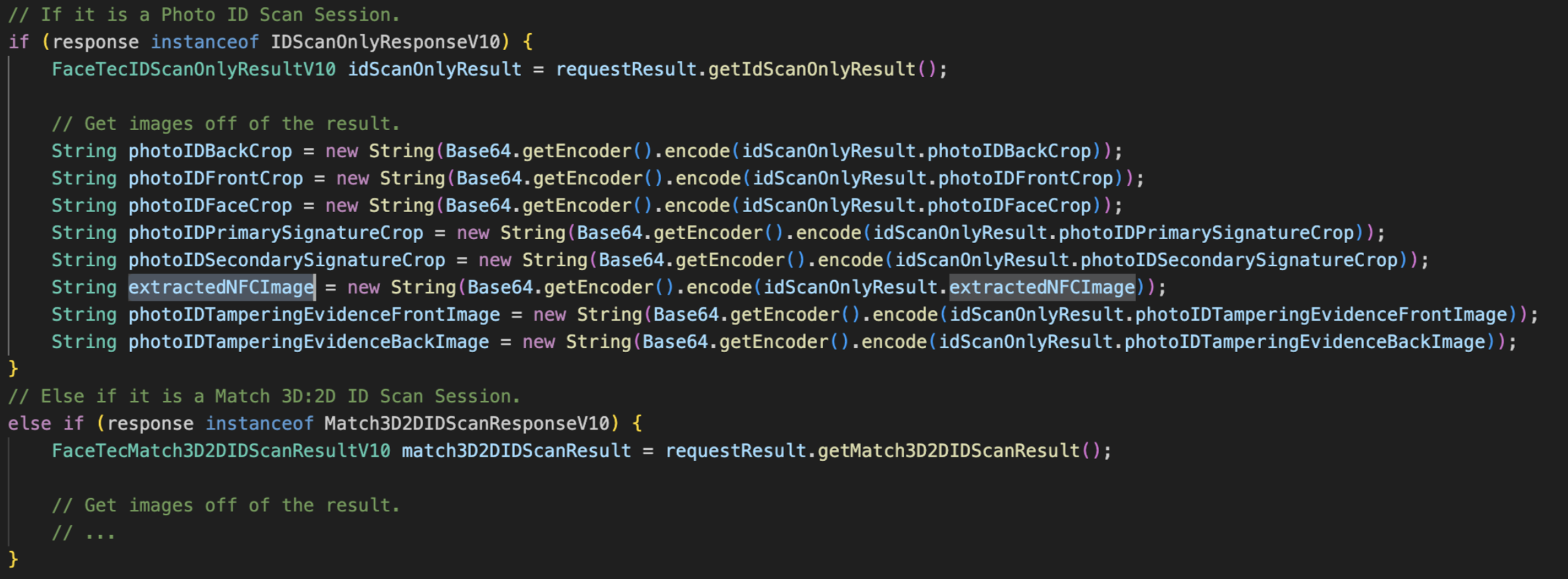
Important Note: The NFC Image is not returned in the API Response, but it can be retrieved in the FaceTec Server by accessing the ID Scan Results.
Retrieving NFC Cryptographic Signature
Every passport that supports the eMRTD/ePassport standard contains a file called the Document Security Object. This file contains a signing certificate, a signature value, and all the information needed for FaceTec to verify that the extracted data matches the provided signature.
When all of this is processed, the FaceTec Server provides the following fields in the resulting documentData JSON:
- signingCertificate - The text of the certificate that was provided by the issuer of the document.
- wasSignedDataValidated - A boolean indicating whether or not the integrity of the extracted data could be verified (according to the given certificate). The FaceTec SDKs accomplish this by determining if the read data matches the hashes in the NFC Chip.
Important Note: FaceTec cannot make definitive determinations about the integrity of the data since FaceTec cannot perform checks to confirm if the certificate is provided by the actual issuing body (government agency or other entity).
NFC Chip Data Verification
NFC Chip Data Verification requires the Document Signing Certificate to be checked against the data that is provided by the Issuing Country. FaceTec cannot perform this check on behalf of Customers and Partners because the terms of distribution from many governing bodies prohibit the distribution of data for commercial purposes.
However, this does not preclude individual entities from using it for their own purposes. To verify NFC Chip Data, Your Team will need to use its own process to check against the data that is provided by the Issuing Country.
Verifying a Signing Certificate
To verify the Document Signing Certificate (DSC) found in an ePassport, it must be checked against data that is provided by the Issuing Country. A great resource for this is the International Civil Aviation Organization (ICAO), which compiles and distributes certificate data from many (but not all) countries.
Links:
- ICAO ePassport Basics: https://www.icao.int/Security/FAL/PKD/Pages/ePassport-Basics.aspx
- ICAO Public Key Directory: https://pkddownloadsg.icao.int
Example:
The example below shows how to determine if the Document Signing Certificate (DSC) is valid by checking if the signingCertificate matches the one listed by the ICAO.

Validating the Extracted NFC Chip Data
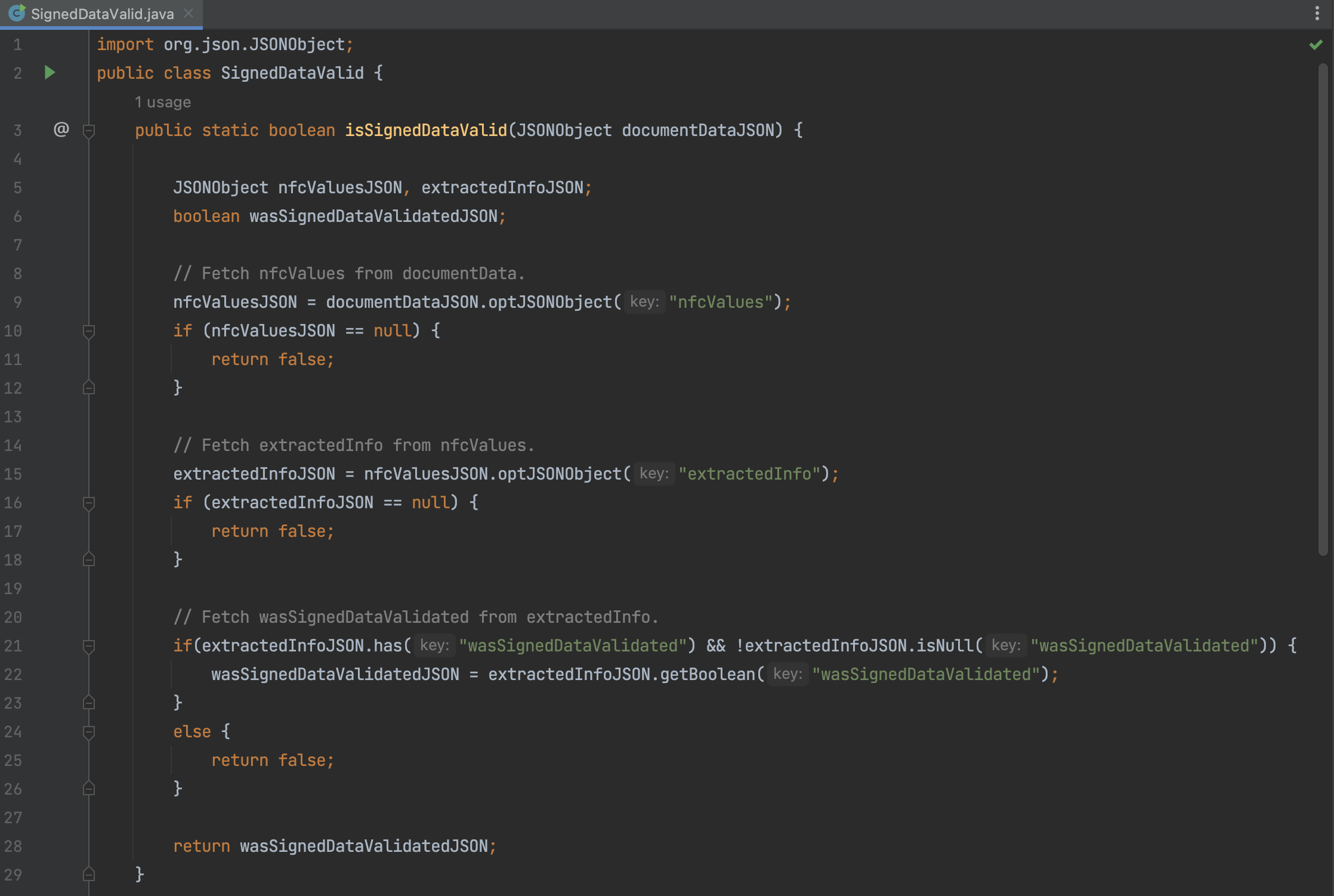
To determine if the data is valid, you will need to access the property extractedValues in the resulting documentData JSON. The extractedValues JSON object contains the nfcValues JSON object, which has its own boolean property, wasSignedDataValidated. The value stored in wasSignedDataValidated will tell you whether the extracted data is valid for the given certificate.
Example:
The example below shows how you can read wasSignedData and determine if the signed data is valid (according to the given certificate).
Frequently Asked Questions
Is Barcode Reading & NFC Chip Scanning supported in the FaceTec Server's Default Implementation?
Yes, Barcode Reading and NFC Chip Scanning are both supported in the FaceTec Server's Default Implementations for MongoDB and PostgreSQL.
Is Barcode Data and NFC Data shown in the FaceTec Dashboard?
Yes, Barcode Data and NFC Data is available in the FaceTec Server's Default Implementation for MongoDB and PostgreSQL. This data is shown in various columns of the FaceTec Dashboard.
Can the Extracted Image from an NFC Chip be used in 3D:2D Matching?
Yes, the Extracted Image from an NFC Chip can be used in 3D:2D Matching. During the ID Scan Portion of 3D:2D Matching, FaceTec will check if a 2D Face Image can be extracted from the NFC Chip. If a 2D Face Image can be extracted, then it is used to perform matching against the 3D FaceMap.
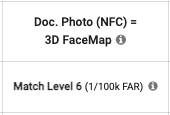
In the FaceTec Dashboard, the Extracted 2D Image is provided in the "Doc. Scan NFC Image" Column. The Match Level Results are provided in the "Doc. Photo (NFC) = 3D FaceMap" Column.
Does FaceTec support NFC User Authentication?
If it is available, the FaceTec SDKs use Password Authenticated Connection Establishment (PACE) for the NFC Chip being Scanned. If PACE is not supported or fails for an unknown reason, the FaceTec SDKs will then resort to using Basic Access Control (BAC).
Does FaceTec support NFC for US Passport ID Cards?
While US Passports (Passport Books) support NFC Scanning, US Passport ID Cards do not. The US Passport ID Cards have an RFID Chip, which is not capable of being scanned via NFC. Therefore, US Passport ID Cards will not invoke the NFC flow in the FaceTec ID Scan Process.
Important Note: FaceTec fully supports NFC for US Passports (Passport Books). The above only applies to US Passport ID Cards, which do not support NFC Scanning.